Comparing Batches in the Trip Plan Analyzer Wizard
The Trip Plan Analyzer Wizard allows you to compare two batches that have previously been saved to the database.
Before you begin
About this task
Procedure
-
Click the Compare button:

The batches are shown in two side-by-side grids. Each grid shows requests, their solutions, and their details in three vertical panes. Solutions that have the same Booking Id are aligned with one another.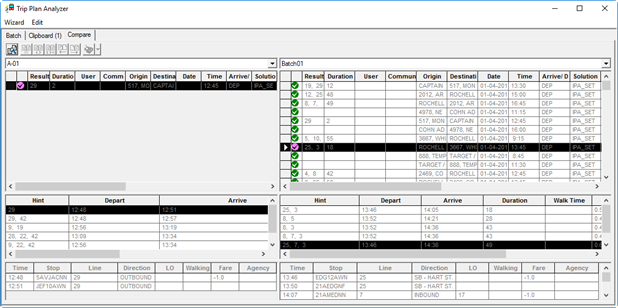 Specific colors indicate how well the requests and solutions match, and if they appear in only one of the two batches:
- Black
- Elements match exactly.
- Red
- Elements exist in both batches, but none match.
- Fuchsia
- Some solutions match, but with differences.
- Blue
- Elements exist only in the batch on the left.
- Green
- Elements exist only in the batch on the right.