
Defining ATIS Parameter Sets
Parameter sets for ATIS are defined in System Properties.
Before you begin
About this task
Procedure
- Click .
- On the Profile tab, click .
-
Click Edit.
The ATIS Parameters dialog box appears.
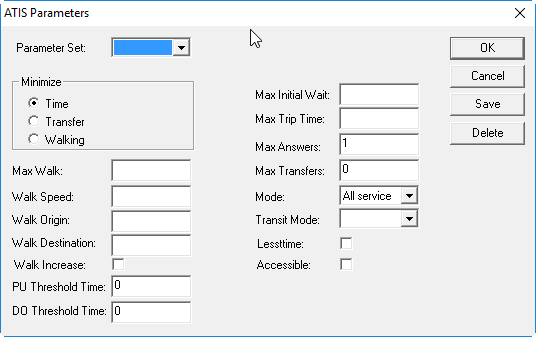
-
Type or select the desired settings.
Appropriate configuration of ATIS parameters varies among sites. The following includes general recommendations:
- Parameter Set
- Parameter set to use.
- Minimize
- What should be minimized for trips: Time, Transfer, or Walking.
- Max Walk
- Maximum distance a client can walk.
This is used to calculate the time required to walk the distance between a point and a stop. Specify a maximum walk distance to have PASS-IPA ignore solutions that require distances exceeding it.
0.99 is recommended.
- Walk Speed
- Average speed that a customer walks.
1.75 miles per hour is recommended.
- Walk Origin
- Maximum distance to search for stops at the trip origin.
1 mile is recommended.
- Walk Destination
- Maximum distance to search for stops at the trip destination.
1 mile is recommended.
- Walk Increase
- If selected, the distance is increased at the trip origin/destination if no stops
are located within the specified distances.
Clearing the check box is recommended.
- PU Threshold Time
- Offset for the time range within which ATIS searches.
This value is entered in minutes. For example, entering -30 would cause ATIS to start its search 30 minutes prior to the requested pick-up time. If this parameter is not used, ATIS will search forward from the requested pick-up time.
- DO Threshold Time
- Offset for the time range within which ATIS searches.
This value is entered in minutes. For example, entering 30 would cause ATIS to start its (backward) search 30 minutes after the requested drop-off time. If this parameter is not used, ATIS will search backward from a requested drop-off time.
- Max Initial Wait
- Ensure that this matches the value specified in the Trapeze6 property .
- Max Trip Time
- Maximum trip time.
This value is entered in minutes.
- Max Answers
- Maximum number of trips to return.
Set this to 1.
- Max Transfers
- Maximum number of allowed transfers.
4 is recommended.
- Mode
- Transit mode to use when planning trips:
- A (all)
- B (buses only)
- R (rail only)
All is recommended.
- Transit Mode
- Transit mode to use when planning trips:
- B (bus)
- R (rail/subway)
- T (train or light rail)
- X (express bus)
- C (commuter rail)
- Lesstime
- This parameter does not apply to PASS-IPA.
- Accessible
- If selected, only accessible stops will be used.
-
Click Save.
The Save Set As dialog box appears.
- In the Set Name field, type a name for the parameter set.
- Click OK.