
Improvements and Bug Fixes
Additional improvements and fixes in this version include:
Clients
-
Fixed an issue in the Funding Sources tab where the Add Funding Source and Save buttons were not center aligned.
Bookings
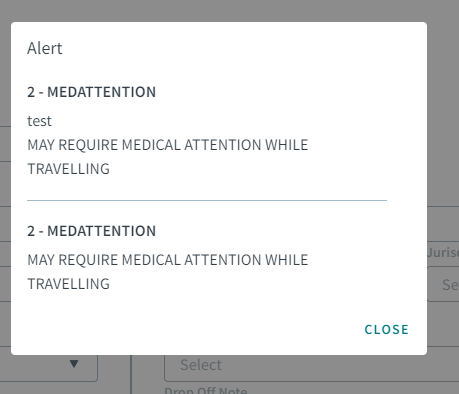
- When creating a new booking for multiple days, selecting dates from the
pop-up calendar in the Date field will show the Client Alerts for all
the selected days.
-
Updated the BookingLegs data table so that Vehicle Type Exclusions can be associated with addresses in booking legs. When address information is updated (added/removed), it will automatically update the Vehicle Type Exclusion in the booking leg.
- In the Unlink modal, you cannot reorder linked bookings. Now, when hovering over a linked booking, the Reorder icon does not appear anymore as it was confusing to users.
- In the Booking sidebar, the Hide and Show buttons were removed.
-
You can now add Mobility Aids to booking legs.
-
Updated the API services that handle the logic for the full name format.
- When creating a new booking for multiple dates, the toast message: A
maximum of 5 bookings can only be created at one time, now appears
when selecting 5 or more dates. Also, the Save, Best Schedule,
Schedule and context menu (three dots menu) are hidden.

-
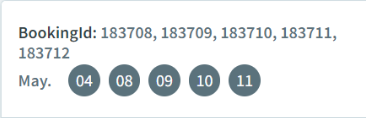
After saving multiple bookings, the booking IDs are now links that can be clicked and will allow you to edit the booking.
-
The following changes have been implemented for when performing Best Schedule or Put On Taxi for new & existing bookings:
-
The Best Schedule button is disabled if any of the mandatory fields are empty.
-
All action buttons (Best Schedule, Schedule, and Put On Taxi) are disabled until after the booking is saved.
-
-
The following updates were made for multiple day bookings:
-
In the context (three dots) menu, the PutOnTaxi option is hidden when multiple dates are selected.
-
In the context (three dots) menu, the Cancel Bookings option is hidden when multiple dates are selected.
-
The Best Schedule button is disabled when the following conditions occur:
-
If the context property to allow Best Schedule is turned off.
-
If multiple booking dates are selected.
-
-
-
The following updates were made to the Client Alerts modal:
-
The modal header was changed from Alerts to Client Alerts.
-
The Dismiss title was added above the checkbox.
-
The modal displays all alert types that are associated with a client for the dates selected, even if the alert type is duplicated.
-
- The Put on Taxi option is now available in the context (three dots) menu for subscription bookings.
- Fixed an issue where providers did not appear in the Provider dropdown menu, despite providers being set in the client profile. Also, the Required field label appeared below the dropdown menu. Providers should not be a required field.
-
Fixed an issue where the Save button was disabled for a subscription booking.
-
Fixed an issue where the Date field was editable when in edit booking mode. Now, the Date field is disabled.
-
Fixed an issue where Best Schedule did not work for a booking with a past date.
-
Fixed an issue where the Schedule Trip list did not appear when the Requested PU time was set to midnight.
-
Fixed an issue where in a new booking, when changing the radio button from Subscription to On-Demand, the Save button was disabled and the Schedule button was enabled. When changing the radio button from On-Demand to Subscription, the context menu (three-dots menu) did not appear, and Schedule button was enabled. The following fixes were done:
-
Schedule and Best Schedule buttons are disabled until the required booking details are entered.
-
The Save button for a subscription booking is now correctly enabled when the subscription is valid.
-
The context menu correctly displays and shows the correct options.
-
-
Fixed an issue where when changing an address in the Pickup Address and Dropoff Address fields, and then saving, the Something Went Wrong popup alert appears.
-
Fixed an issue where the the Cancel button did not work in the Link and Unlink modals.
-
Fixed an issue where the bookings grid was stuck on loading when searching with a Client ID filter parameter.
-
Fixed an issue where when adding a leg or adding a return trip to a subscription booking, the radio buttons are disabled and console errors appear.
- Fixed an issue where adding a return trip to a new and existing booking did not link the trip.
-
Fixed an issue where a booking could not be save without a provider selected from the dropdown menu.
- Fixed an issue where when the same address is selected for the Pickup Address and Dropoff Address fields, there was no error message. Now an error message appears below the fields.
-
Fixed an issue where the Calculate Fare button was not displaying.
-
Fixed an issue where when an address was selected from the Pickup Address or Dropoff Address fields, the related fields below it were disabled.
Booking Wizard
-
The logic for Search Window has been improved where the combination of the security permission: enableSearchWindow and the context property: isSearchWindowOn will determine if the Search Window toggle is enabled or disabled. Previously, if only the security permission was set to Allowed, there would not be any solutions.
-
Fixed an issue where if an invalid Violation Set or Parameter Set is used, the error toast message appeared: Times entered are not valid. Please modify and try again. This should not occur. The system should automatically ignore invalid values and use default values.
-
When finding solutions for template bookings, the Find Solution API will use the day of the week of the booking and schedule type ID to determine the schedule ID.
Schedule Editor
-
When editing a template booking, updating a field and saving now ignores the
CheckPrioriBookingAPI call.
Batch Scheduling
-
Fixed an issue in Select Trips, where when choosing a date that didn’t have an active schedule, there was no messaging indicating that a schedule did not exist for that date. Now, the following an empty state message appears: The schedule does not exist for the date selected. Please select a valid Schedule Date.
Maps
-
Improved the map so that when the map is opened, closed, or resized on one page, the map state will be retained for other pages.
EZ-Wallet
-
Fixed a backend issue that caused the EZ-Wallet period pass name to display four times.
Date Rules
-
Fixed an issue where some of the dropdown boxes had double asterixis beside the labels.
-
Fixed an issue in Date Rules modal where clicking the See Details button closed the modal instead of showing the preset rules.