
Creating Security Groups for Providers
Assigning security permissions to provider records prevents vehicles, runs, clients, and trip information from being seen or modified by other providers.
About this task
Permissions do not need to be assigned to a security group for it to be used for provider security. After assigning the security group to a provider in the Trapeze4 Workstation, only users who belong to the security group will be able to see the provider's information when using PASS.
Procedure
- In the Trapeze6 Client Shell, click .
- Expand the Security folder.
-
Right-click the User Groups folder, and then click
Add New User Group.
A dialog box appears.
- Type a name for the provider security group.
- Click OK.
-
Assign the security group to all users who should belong to it:
-
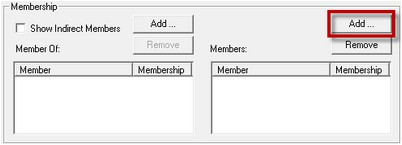
In the Membership pane, click the Add
button above the Members table.
-
Click the Save button:

-
In the Membership pane, click the Add
button above the Members table.
What to do next
For information about managing security in the Trapeze6 Client Shell not covered in this guide, refer to the PASS System Administrator and User Guide.