
Analyzing Trips from Trip Administration

You can select trips in Trip Administration and analyze them in the Trip Plan Analyzer Wizard.

Before you begin

The Trapeze4 Workstation must be open.

About this task

Typically, you would analyze groups of trips from Trip Administration. Trips can be analyzed using criteria such as date, time, and solution set/parameter set.

Procedure

  1. Click Task > Trip Administration.
  2. Search for and select the trips to be analyzed.
    To...Do this...
    Select multiple adjoining trips Press the SHIFT key while clicking on the first and last trips.
    Select multiple trips Press the CTRL key while clicking on the trips.
    Select all trips Click the leftmost cell in the grid heading row.
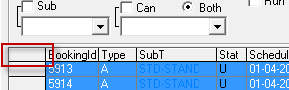
    The leftmost cell in the grid heading is surrounded by a box as an example of where the select all option can be found in Trip Administration.
  3. Right-click in the highlighted area and click Trip Plan Analyzer Wizard.
    Initially, question marks (representing undetermined results) appear in the column beside the listed trips.
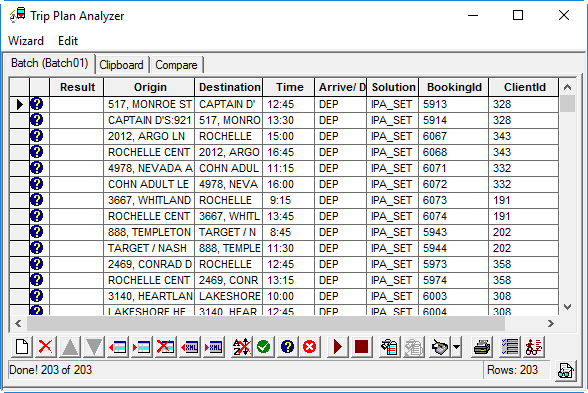
    The Trip Plan Analyzer Wizard with Undetermined indicators (question marks) visible for all listed trips.
  4. To analyze trips for matching fixed route itineraries, click the Run Batch button:
    Play button (right-facing arrowhead).

Results

The question marks become either check marks (successful requests) or x marks (failed requests).

What to do next

Save the batch, re-evaluate the trips using the Change Request feature, and compare the results.