
Setting ATIS Properties
Specific Trapeze6 properties (also called context properties) are needed for PASS-IPA to work with ATIS.
Before you begin
About this task
Procedure
-
Navigate to .
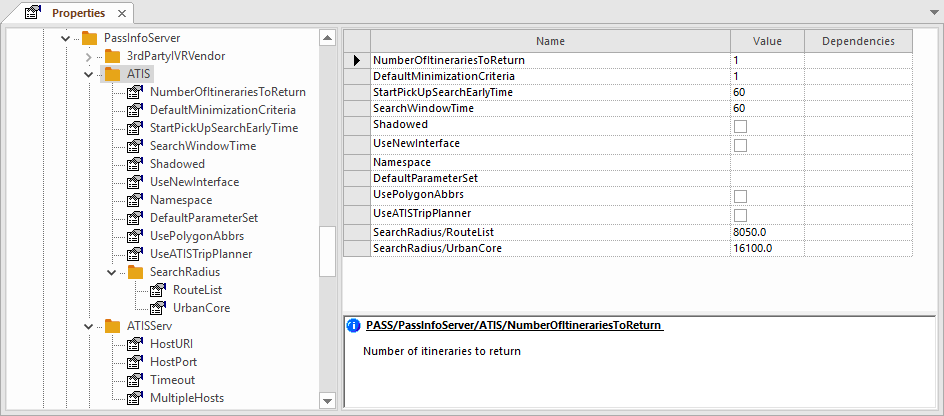
-
Click ATIS and set ATIS properties:
- NumberOfItinerariestToReturn
- Set this to 1.
- DefaultMinimizationCriteria
- Default criteria to minimize when determining
solutions.
Consult a Trapeze Customer Care representative for assistance with this property.
- StartPickUpSearchEarlyTime
- Specify the earliest time for which ATIS can search for booking solutions when a requested pick-up time is specified.
- SearchWindowTime
- Duration of the search window in seconds.
Set this to 120 minutes.
- Shadowed
- Legacy clients only. If selected, solutions will be also be sent to the ATIS server.
- UseNewInterface
- Select this option. The new ATIS interface is used.
- Namespace
- Site-specific property that ATIS uses to identify your site.
This must be provided by your ATIS representative.
- DefaultParameterSet
- Leave empty.
This is the default ATIS parameter set. ATIS parameter sets are defined in Trapeze4 system properties.
- UsePolygonAbbrs
- Select to send polygon abbreviations instead of polygon IDs to ATIS.
- UseATISTripPlanner
- Select
to use the ATIS trip planner. Otherwise, the INFO trip planner is
used.
This is used in the Trapeze4 Workstation. It does not affect Schedule Server.
- Legacy
clients only.
Solution search radius around the route list.
- Legacy clients only.
Solution search radius around the urban core.
-
Click ATISServ and set ATISServ properties:
- HostPort
- Specify the port that the Service Shell uses to communicate with ATIS.
- HostURI
- Specify the address that the Service Shell uses to communicate with ATIS.
This must be provided by your ATIS representative.
The HostURI must include /cgi-bin-soap/soap.cgi after the IP address.
For example, http://172.16.1.84:80/cgi-bin-soap/soap.cgi.
- Timeout
- Specify the amount of time that the Service Shell waits for a response from ATIS before timing out.
- MultipleHosts
- If multiple hosts are used for load balancing, specify the http address (with
port) and service name of the ATIS servers.
For example, 10:00-10:00|http://172.16.1.84:80/cgi-bin-soap/soap.cgi, http://172.16.1.85:80/cgi-bin-soap.cgi;10:00-15:00|http://172.16.1.85.80/cgi-bin-soap.cgi
-
Click and set the following properties:
- Default solution set
- Solution set defined for ATIS.
-
Click the Save button:

-
Set ATIS properties in the Trapeze4 Workstation:
ATIS Properties in Trapeze4 and Trapeze6 should match.