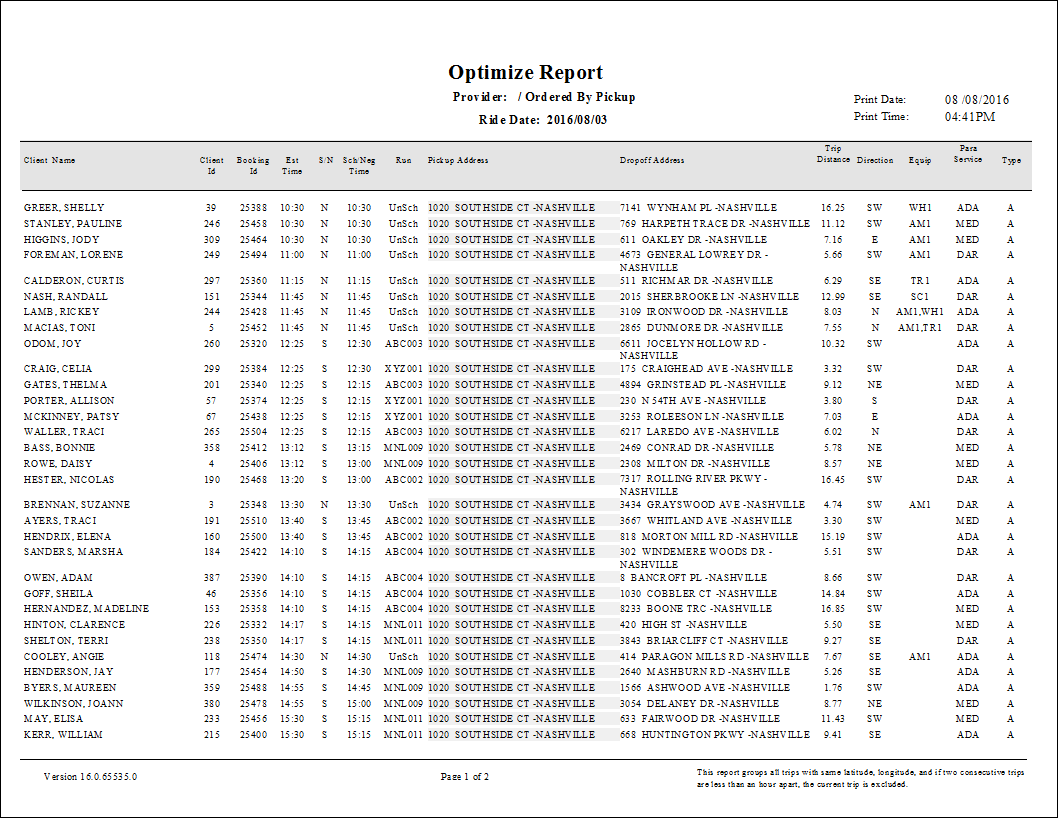
Optimize Report
The Optimize report groups trips that have the same longitude and latitude coordinates and are scheduled within one hour of each other if they are not all scheduled on the same run. The report shows both scheduled and unscheduled trips.
| Parameter | Description |
|---|---|
| Type | Schedule type. Note: The report can only be run for live schedules. |
| Date/Weekday | Specifies whether the report is for specific date or day of the week. Choose the
option appropriate for the schedule type:
|
| Para Service | Choose the paraservice for the report from the list. |
| Booking Subtype | Booking subtype for the report. |
| Provider | From the drop-down list, choose All or a specific provider for the report. |
| Group by Provider | If selected, records are grouped by provider. |
| Group by | Specifies the method of grouping trips: by Pickup, Dropoff, or Pickup and Dropoff. |