
FX System Properties for FLEX
To access the FX system properties that work with FLEX, click .
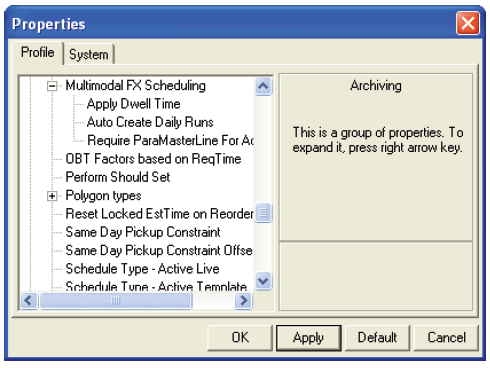
The following system properties are displayed:
-
Apply Dwell Time: If set to Yes, FX estimated times take into account passenger load/unload times.
-
AutoCreate Daily Runs: This is similar to the FLEX Scheduling system property but applies to FX runs. If set to Yes, the Schedule Server automatically creates daily FX runs directly from the FX tables even if the run does not have a master run record in PASS. You must reload the Schedule Server when you enable this property.
-
Require ParaMasterLine For Activation: If set to Yes, the Schedule Server only auto-creates FX runs for those that have an entry in the ParaMasterLine table. If set to No, then any applicable LineIdConst can be used to auto-create a run, regardless of whether or not there is an entry in the ParaMasterLine table, which associates PASS data with FX lines. This property is used only when the Auto Create Daily Runs property is set to Yes.Note: Contact your system administrator or Trapeze representative for more information on FX and PASS system properties not covered in this section.