Improvements and Bug Fixes
Additional improvements and bug fixes for 7.3 released on October 7, 2024
General
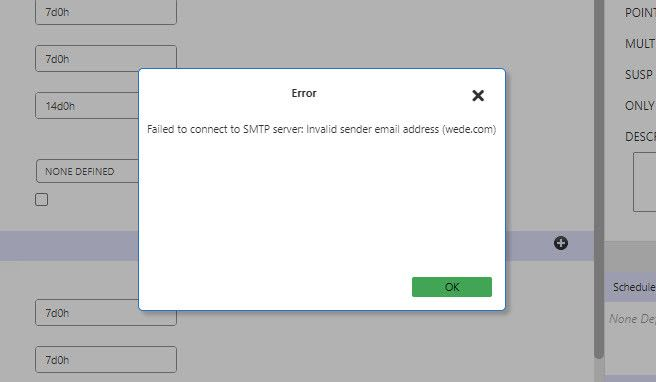
- Improved the notification pop-up alert for an invalid email address that was
set in the context property: PassEligibility >Email > Email
Address.
Cases
-
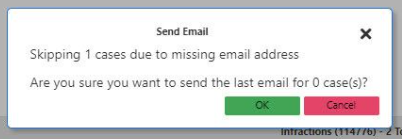
Additional information about skipped cases with no/invalid email addresses are now displayed in the Send Email confirmation pop-up box.
-
Fixed an issue where the date in the Suspension Start Date box did not display for a client.
-
Fixed an issue where when downloading a letter (Download > All in Phase) for cases in the Warning Alert 1 - Delivered phase returned a
404 error. -
Fixed an issue where when adding a new infraction from the PASS workstation, a case did not transition from the Violation Alert - Closed phase to Violation Alert - Investigation phase, but remained closed.
-
Fixed an issue where when clicking on the Download button in Print, the Word file did not display the infractions details.
-
Fixed an issue where issuing a letter in batch mode caused an exception error to be thrown in certain situations. This was due to multiple threads accessing the same
DbContextinstance. -
Fixed an issue where when loading the Cases screen, the loading icon (spinner) did not stop and remained on the page.
-
Fixed an issue where when after attempting to promote “NS” cases, the progress bar was stuck on loading. Then, after restarting Service Infractions, the Login screen did not appear.
-
Fixed an issue where when batch sending pending emails (Send > Pending in Phase), emails were already sent out are sent again.
-
Fixed an issue where the Upload button for Letters and Emails were enabled for cases outside of the Compose phase.
Policy
- For Points-based policies, the settings can no longer be modified after the
policy has been created. This update was implemented to handle the challenge
of switching from a points-based (0.5) to non points-based (1) policy. When
a points-based policy is switched to a non-points based one, it becomes
impossible to update the From and To violation counts on suspension stages
to valid integer values. See the following example:
-
Level 1: From 0 to 0.5
-
Level 2: From 1 to 1.5
-
Level 3: From 2 to 2.5
-
Subsequent: From 3 to -1
-
-
In Policies and Cases screen, the policy tree in the side pane can be resized.
-
Removed an unnecessary scroll bar in the Add Warning Alert dialog box.
Infractions
-
In Infractions, when a client name or ID is being typed in the Client box, a list of matching results will display in the box.
-
Fixed an issue in Infractions where when the Start Date, End Date, Policy, or Stage fields were changed, the client ID was being retained, resulting in an incorrect value being sent in the background of the web browser (DevTools > Payload tab).
-
Fixed an issue where the Infraction widget was displaying missing and incorrect options.
-
Fixed an issue where inconsistent icons displayed for confirmed and forgiven infractions. On Infractions widget with a case ID, it shows = (equal sign) icon for forgiven infractions, and a check mark icon for confirmed infractions. It should be an X icon for confirmed infractions and a check mark icon for forgiven transactions.