Place text in quotation marks for exact match search results.
BlockBuster
Trapeze introduces a major change for BlockBuster in version 19: it is now a
browser-based application.
Main Changes
Web browser access - In the same manner that you could access a
desktop application hosted in a remote server, you can access the new Blockbuster through
a standard web browser on a computer with an Internet connection. It can be hosted on the
Microsoft Azure cloud platform or on a local host server.
Simplified workflow - Almost all of the functionality of the
previous versions have been carried over to BlockBuster version 19. Some of the
functionality has also been modified, however, since the workflow has been
simplified,
Responsive web design - The new Blockbuster has been designed
to render well on the small screens of mobile devices such as tablets.
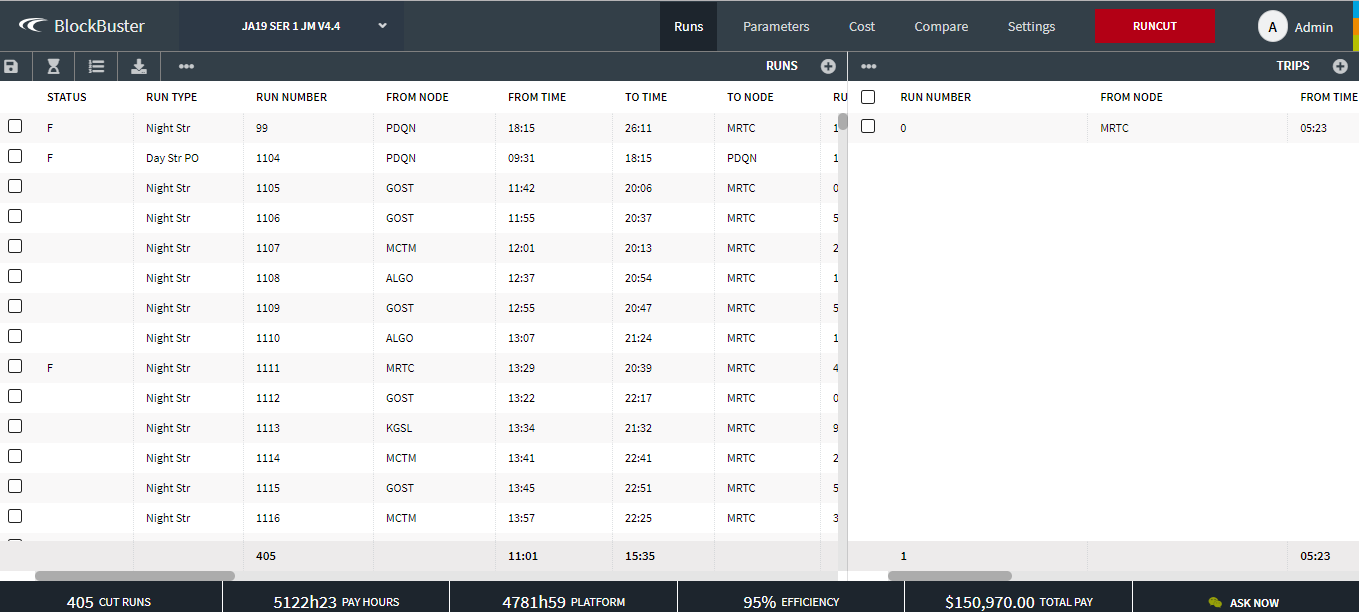
The following is a sample view of the Runs screen:
Security
To maintain our high level of system security and in accordance with industry best
practices, the following security keys have been added for Blockbuster and its components:
Trapeze5/Ancillary/View - Sets the security permission for the Ancillary data
screens.
Trapeze5/BlockBuster/View - Sets the security permission for the BlockBuster and
Graphical Runcutting screens.
Trapeze5/Travels/View - Sets the security permission for the Travels screen.
Trapeze5/RunReliefRestrictions/View - Sets the security permission for the Run
Relief Restrictions screen.
Trapeze5/BusGraph/View - Sets the security permission for the Bus Graph screen.
Reports/SQL Reports/Edit SQL Report Query – Controls where SQL reports can be
edited.
Reports/SQL Reports/View - Controls where the SQL Reports screen can be opened.
Reports/Text Reports/View - Controls where the Text Reports screen can be
opened.
Reports/Crystal Reports/View - Controls where the Text Reports screen can be
opened.