
Adding Run Relief Restrictions
Run relief restrictions are limitations that you place on reliefs by defining the conditions where a relief is not allowed. The system applies these restrictions when relief events are updated.
-
On the Ancillary list, click Run Relief
Restrictions.
The Run Relief Restrictions screen appears.
-
On the screen toolbar, click the Add New button:
 A new row appears with blank fields on the top row of the grid.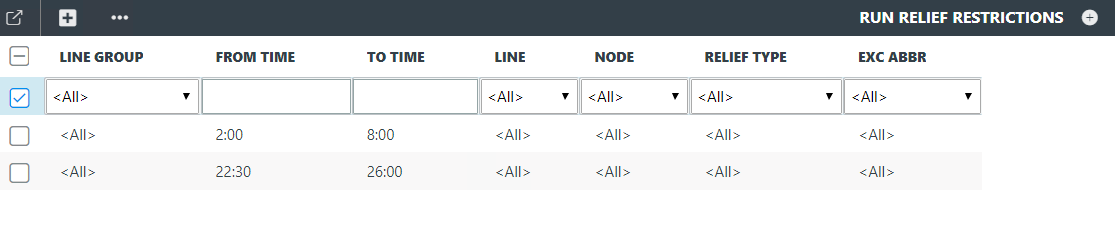
- In the Line Group list, select the line group of the line where you want to apply the restriction.
- In the From Time and To Time columns, type the start and end of the time period when you want the restriction to apply.
- In the Line list, select the line to which the restriction applies.
- In the Node list, select the specific node to which the restriction applies.
- Optional: In the Relief Type list, select < All > or an appropriate relief type.
- Optional:
In the Exc Abbr list, perform one of the following steps:
- If you select All, reliefs on trips with any type of exception are not applied. (This is the default.)
- If you select an exception, reliefs on trips with the selected exception are not applied.
- If you select Off, the system applies relief restrictions to all trips.
-
Click Save.
A message asks if you want to save or discard your changes.
If you do not wish to save the record, click Discard.
To save the record, click Save.
The new run type is added to the Run Relief Restrictions grid.