
Setting Report Parameters
After you have selected the report you want to run, you must set the parameters to enable the system to determine the data to be included in the output.
-
Do one of the following steps:
- On the screen toolbar, click the Run button:
 .
. - Right-click on the Reports screen and click Run.
The Enter Parameters dialog box appears. - On the screen toolbar, click the Run button:
-
Set the value of the parameter that you want to apply as appropriate:
- Select an option from the list.
- Select a date from the drop-down calendar.
- Select or clear the check box to enable or disable the option. If there are check
boxes beside each option, you can select more than one. To select all, click the check
box beside the header of the list:
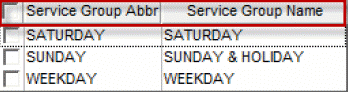
- Type the value in the field, for example, for example. type a date in the Effective Date field.
- Browse the file directory and select a file, for example, for the CSV File Directory field.
Note: Some fields are only enabled after you have set a value to a prior field, for example, in the Block Statistics report, you must select a sign-up period (Signup Name) before the Line Group Abbr field is enabled.