
Creating Custom Parameter Sets
It is important to understand how the system is using parameters to search the available data to give you the results you want when making a request.
Adjust parameters in one or more saved custom sets. A custom set is a saved set of parameter values, for example: Afternoon, Evening, Test 1, Test 2, or any other set you want to create. From the Custom Set list, choose the set you want to use and/or adjust.
- Change the parameters as you like in any existing set.
-
Click Save As to create a new set.
The Save Parameter As dialog box opens.
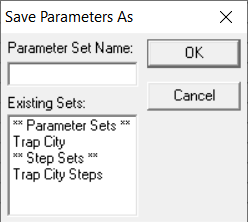
- In the Parameter Set Name field, type the name of your set.
-
Click OK.
The previous set is not changed nor deleted.