
Changing the Search Specification
When the system is unable to generate itineraries, you are advised of the reasons and the system may recommend some actions to resolve the issues.
-
Perform one of the following methods to select the sort method you want to apply:
- Click your desired optimize button (By Time, by Walking Distance, by Number of Transfers, or by Lowest Fare).
- Click and select the option you want.
-
Click Start Itinerary Search:

The Details tab shows the itinerary data.
If the search is unsuccessful, the Unable to find solutions dialog lists the reasons why the system is not able to find any itineraries as well as lists a recommended action to resolve any issues: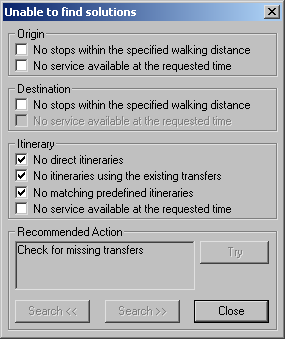
- After reading the selected issues and the information in the Recommended Action frame, perform the recommendation. (Your systems administrator may have to perform certain recommendations.)
- Optional: If the Try button is activated, click it to perform the recommended action.