
Generating SSL Certificates in XGate5
If your XGate Server is running version 5.6 and higher, XGate can automatically create a self-signed certificate.
Before you begin
Procedure
- Go to the Settings screen.
- Select Channels and select the Secure channel created for DriverMate.
-
Click the Add button:

-
Rename the Friendly Name that appears by default or leave it as is.
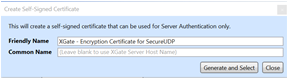
- Click Generate and Select to create the certificate.
-
To view details of the certificate, click the information button:

The thumbprint is needed in the
DriverMateXam.jsonfile.