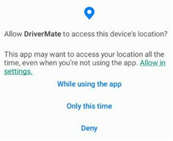
DriverMate Permissions
When you first launch DriverMate, you will be prompted to accept several permissions. Accept all permissions to allow DriverMate to function properly.
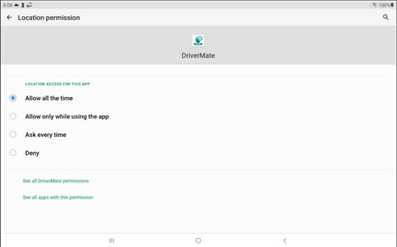
Important: DriverMate continuously requires access
to the device’s location. Selecting anything other than Allow all the
time will cause issues within the application.
-
The options shown depend on the Android version of your device. In devices with Android 10 or earlier versions, select Allow all the time. If using Android 11 or later versions, the Allow all the time option is only shown in the Locations permissions screen. Select Allow in settings, then Allow all the time.
- When prompted, select Allow or While using the
app to grant all permissions.