
Selecting Schedules
The Change Schedule feature is not used often because the mobile computer uses a real-time based system. It is used mainly for testing.
About this task
Procedure
-
Click ServerChange Schedule.
The Please Select a Schedule dialog box appears. The Schedule Types displayed are similar to the schedule types required for Trapeze PASS: Live or Template.
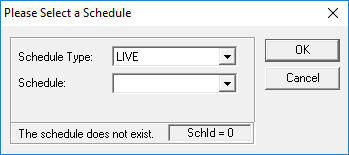
- To look at the data of a specific date, select the date you want in the Schedule list.
- Click OK.