
Using Switches
The CDebug tool identifies and tracks errors in the software. Switches are options that enable you to filter or refine commands in a specified manner.
About this task
Procedure
- In the Bin folder, click MSrv41_2.
- In the MDT Server screen, click . The Trace Options dialog box opens.
-
On the Listeners tab, select the File Trace Listener check box. The CDBlogTrace Listener check box is selected by default.

-
Perform one of the following steps:
- Keep the CDBlogTrace Listener check box selected.
- Clear the CDBlogTrace Listener check box and select the FileTraceListener check box. The Configure Listener button is activated. Click the Configure Listener button.
The FileTraceListener Configuration dialog box appears. This feature allows you to store the log files in the local server and in the largest partition available.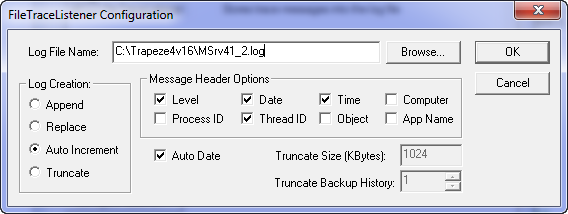
-
In the Log File Name field, do one of the following:
- Type a path name.
- Click the Browse button to select an appropriate file path.
-
In the Log Creation frame, select one of the following options for how you want the log files to be created. Append: The log files are added at the end of the previous log files. This option is selected by default. Replace: The system replaces the previous log files with the new log files that are created.
Auto Increment: A fixed number of log files is added to the previous log files daily. This keeps the files from getting too large and automatically starts a second set to avoid the creation of very large files.
Truncate: The system limits or shortens the size of the log files to a certain number of characters.
- Optional: To automatically add the date to the end of the Log File Name, select the Auto Date check box.
-
In the Message Header Options frame, select the options that you
want to see in the log files, (for example, date or time).
The options you select are determined by your mobile computer vendor requirements.
- Click OK.
- In the Trace Options dialog box, click Apply.