
Creating Cost Breakdown Definitions
Cost breakdowns are primarily used to describe costs for providers and label cost breakdowns clearly in Run Itinerary view in Schedule Editor.
Before you begin
About this task
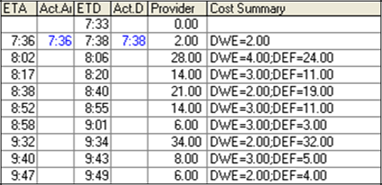
Grouping and labeling costs applied by provider contracts creates clarity in reporting. To maximize the benefit of cost breakdowns, create a separate cost breakdown code for each type of pricing rule. For example, slack time charge, standard time charge, deadhead charge, dwell time charge.
Procedure
-
Click .
The Cost Breakdown dialog box appears.
- In the Type field, type a code for the cost breakdown type you wish to create.
- In the Name field, type a description of the cost breakdown type.
- Click the Add button.