
About Setting Up PASS-IPA
Specific steps must be taken when configuring PASS-IPA to operate in the Trapeze environment.
Prerequisites for Installing PASS-IPA
Before PASS-IPA can be installed, the following applications must be installed and configured correctly:
- Trapeze PASS
- Trapeze INFO trip planning system
- Trapeze FX (with INFO)
Refer to the appropriate guides for the correct set up and configuration of PASS, FX, and INFO.
Query
INSERT INTO Propvalues (Profileid, UserId, PropGroupId, PropId, proptype, LongValue)
values(0,0,1,35,1,1)
Additional Queries
These queries are to copy over all Fare* tables to InfoFare* tables. This is only required if the data did not use CTM Engine previously.
The major differences between the two sets of tables is the inclusion of the Agency column in InfoFare* tables.
These queries only need to be run once. The 20170313(effectivedate) and signid should be changed depend on the result from select * from signupperiods
INSERT INTO InfoFareCost (FareId, FareCostId, PassengerTypeId, FromTime, ToTime, ServiceGroupId, Fare, AgencyId)
SELECT FareId, FareCostId, PassengerTypeId, FromTime, ToTime, ServiceGroupId, Fare, '1'FROM FareCost F
INSERT INTO InfoFareCostClass
SELECT FARECOSTID, FARECOSTDESCR, '1'
FROM FareCostClass F
INSERT INTO InfoFarePassengerType
SELECT *
FROM FarePassengerType
select * from signupperiods
This query should be run for any sign up period which extend to a future date:
INSERT INTO InfoFareRule (LineIdConst, CostId, CostType, FareHint, EffectiveDate, AgencyId)
SELECT F.LineId, F.CostId, F.CostType,F.FareHint, '20170313', '1'
FROM FareRule F
WHERE SignId = 72
INSERT INTO InfoFareZoneClass
SELECT FAREZONEID, FAREZONEDESCR, '1'
FROM FareZoneClass
INSERT INTO InfoFareZoneGroup
SELECT FRID, TOID, FARECOSTID, FAREZONEGROUPID, '1'
FROM FareZoneGroup
Confirming PDEF_INFO.xml Exists
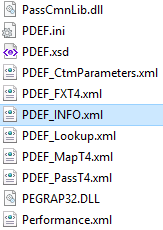
This file contains back up default context properties that may be used by CTM Server. If system administrators need to change default context property settings, they should use the Trapeze6 Client Shell.
Using the Booking Validation Service
The system can use Trapeze4 Workstation logic or the Trapeze6 Booking Validation Service when using PASS-IPA or PASS-WEB with Trip Booking. This document assumes that Trapeze4 is being used. If Trapeze6 is used, then many of the property settings described in Trapeze4 must be set in Trapeze6 because that is where the booking validation service gets its context properties.
To check or change the current setting, in the Trapeze4 Workstation, click . On the Profile tab, click .