
Cleaning the Message Queue
This function should be used under advice from your Trapeze representative.
About this task
The Clean function is used to resolve problems by removing all messages in the queue.
Procedure
-
Click .
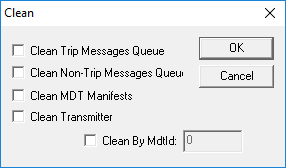
The Clean dialog box appears.
-
Select one or more of the following options:
- Clean Trip Message Queue
- Removes all messages in the message queue for all vehicles.
- Clear Non-Trip Messages Queue
- Removes all non-trip messages such as free text, configuration and emergency messages.
- Clear MDT Manifests
- Clear the manifests of all vehicles.
- Clean Transmitter
- Resets the transmitter.
- Optional: To clear the messages of a specific MDT, select Clean by MDTId and type the ID of the specific MDT in the blank field.
- Click OK.