
Specifying Speed Factors
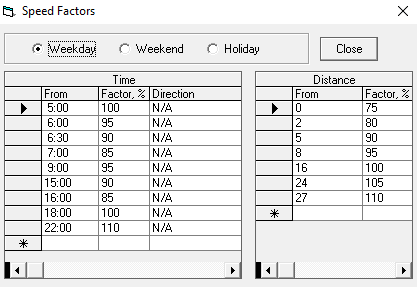
A speed factor is a number that represents a percentage with which to calculate estimated travel times for events on runs.
Before you begin
- Go to .
- In the Profile tab, click .
About this task
To specify that a driver's speed affects the average speed on a run for estimated travel time calculations:
Procedure
- First select a run from the Schedule Administrator application.
- Click .
- Select the time of the run.
-
In the Factor, % column, enter a percentage number into
the field of that time.
Example
If the average speed is 50 mph and the vehicle needs to travel about 10 miles from the pick-up location to the drop-off location, the system will calculate the estimated time as: 10 miles ÷ 50 mph = 0.2 hours (12 minutes). If the driver’s speed will be 80% of the normal average speed on a run for estimated travel time calculations (for example, during rush hour). The system will calculate the speed as: 0.8 x 50 mph = 40 mph. Therefore, the new estimated travel time is calculated as: 10 miles ÷ 40 mph = 0.25 hours (15 minutes).
A speed factor of 80 would increased this estimated trip time by 3 minutes, which could result in client pick-ups and drop-offs being later than the requested times. These notifications are displayed as violations in run itineraries and in the Schedule Editor screen. Refer to the PASS System Adminstrator and User Guide for a list of violations and their descriptions.