
Setting Context Properties and Security Key Permissions
Properties and security key permissions in Trapeze6 control the system appearance and behavior of PASS and other Trapeze4 applications.
About this task
Procedure
- In the Trapeze6 Client Shell, click .
-
In the left pane, navigate to the click the plus sign (+) to the
left of folders, following the path specified for specific system password properties or
EZ-Wallet properties.
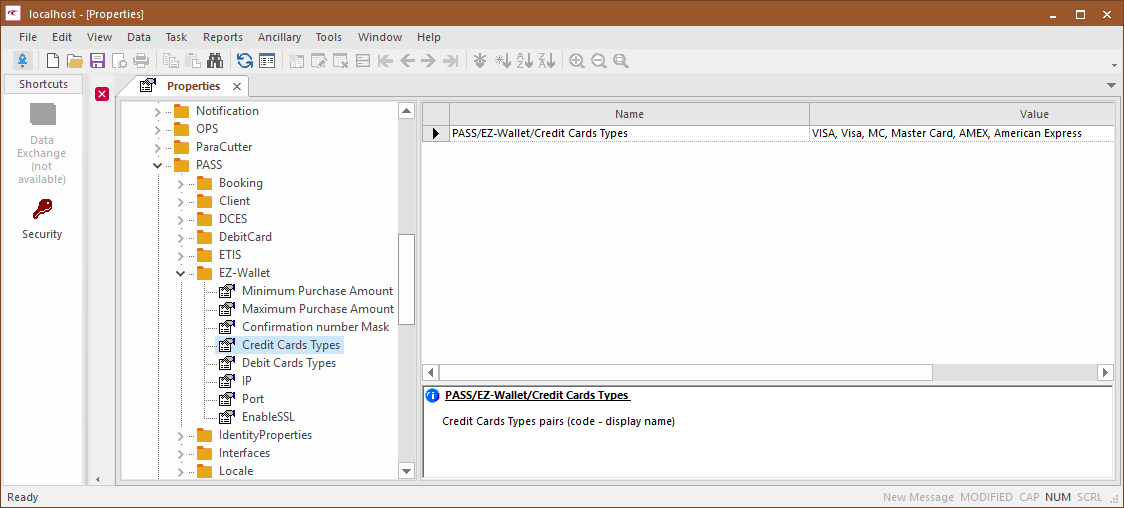
Trapeze6 properties are also called context properties. - Adjust a specific property by selecting it, clearing it, or typing a specific value for it.
-
After altering the property, click the Save button:

- Navigate to and adjust any other properties that should be updated.
- Click .
- In the left pane, click the plus sign (+) to the left of folders and follow the path specified for specific EZ-Wallet security key permissions.
- Adjust the permissions as needed.
- Adjust a specific permission by selecting it, clearing it, or typing a specific value for it.
-
After altering the property, click the Save button:
- Edit any other EZ-Wallet security key permissions that should be updated.