
What's New in Version 21
EZ-Wallet v21 contains a number of improvements.
Items with a * were introduced (partly or in whole) in maintenance releases of previous versions.
EZ-Wallet is accessed through the Trapeze4 Workstation using .
-
A new job type called Period Pass Import has been created for Schedule Job Agent that will automatically import the contents of a .CSV file. The import process will validate each record by ensuring the ClientId and period pass in the provided .CSV file exists. This will be completed prior to creating/inserting a purchase transaction record and log failed record. *
The following are key features from the .CSV file import:
- If the Purchase Amount is provided, it will be copied to the TransactionAmount field, otherwise it is not required if the .CSV column is empty.
- If the Purchase Amount is provided, it will be copied to the CashAmount field, otherwise it is not required if the .CSV column is empty.
- If the Confirmation Number is provided, it will be copied into the ConfirmationNumber field, otherwise it is not required if the .CSV column is empty.
- Each transaction will be uniquely identified with a transaction identifier.
- Period Pass transactions resulting from imported records will appear in EZ-Wallet extracts.
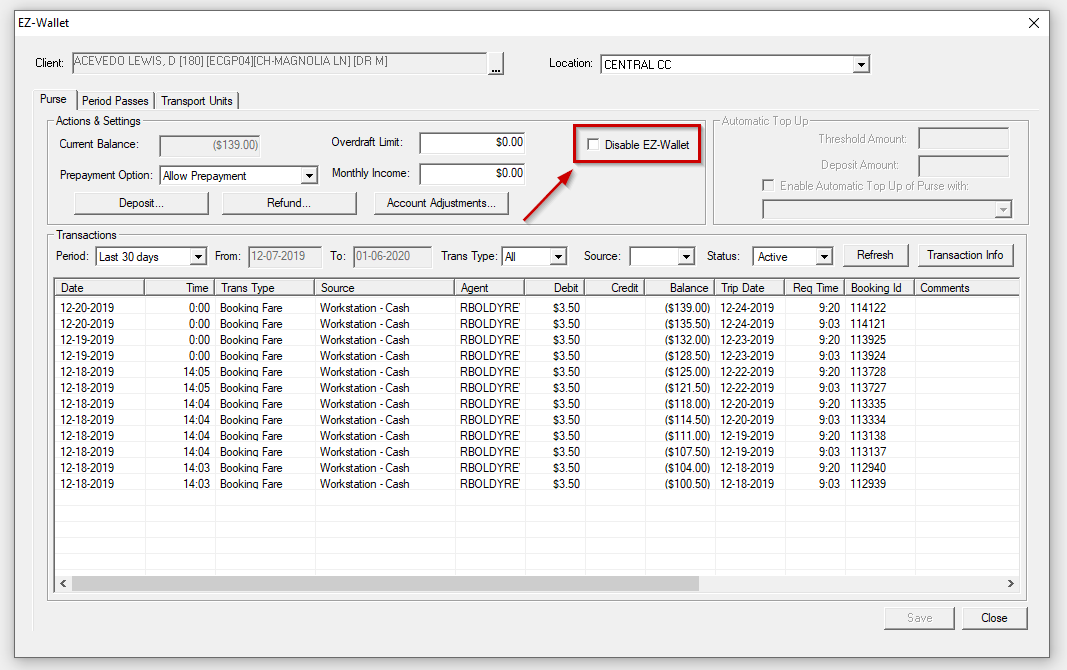
- In client EZ-Wallet dialog box, there is now a Disable
EZ-Wallet option to disable the client EZ-Wallet and not deduct from
period pass, money from purse, and transport unit when calling PassCreateTrip and
prepayment is set to required or allowed. *
- Prepayment logic is now incorporated in the EZ-Wallet API interface with INIT. The
following enhancements have been incorporated to EZ-Wallet API:
- When prepayment is required, a booking cannot be scheduled unless it is prepaid. For example, the client account did not have sufficient funds to subsidize 100% of the fare amount, so the booking could not be scheduled.
- When prepayment is allowed, a booking requires prepayment but can still be scheduled. For example, the client account did not have sufficient funds to subsidize 100% of the fare, but the booking was still scheduled. Instead, the fare can be collected during pick up by the driver.
- Prepayment is not required.
This feature is enabled through Trapeze6 context property configurations and with Job Agent setup.