
General New Features
This document highlights the new features and changes in FX version 19. Items with a * were introduced (partly or in whole) in a maintenance release build of v18.
Properties
- The following user-defined properties have been added:
- Show Patterns/Stop Pattern zero distances in red - If set to Yes, the distances of nodes and stops that are 0.0 (zero) are shown in red on the Patterns and Stop Patterns tabs of the Route Definition screen.
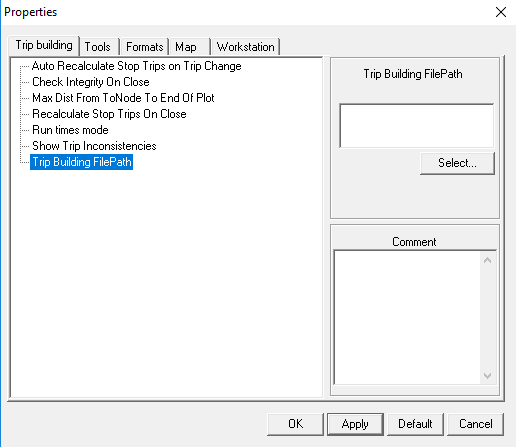
- Trip Building File Path - Allows users to set the file path
to where they want to save trips in XML files. To view the property in the
Properties dialog, click with the Trip Building screen open.
- Route Trace Uses Route Color - If set to Yes, the color of the selected route is defined in . If set to No, the color is set through the property.
Ancillary Data
- Users can now choose to delete a sign-up period immediately after selecting it or schedule the deletion on a later date and time.
- A new column, Exc Combo, which shows if there is an exception applied to the holiday, has been added to the grid in the Holidays ancillary data dialog.
Mapping
- When selecting a point while plotting pattern traces on Google Map, the Crosshair icon now appears instead of the Hand icon (which shows grabbing motion).*
-
The Zoom In, Zoom Out, and Full View buttons are now available in the Google Maps display in the Trapeze4 workstation.*
- When using Google Map, users can now plot pattern traces by two options: line trace (clicking stops on a selected line) or freehand. (The options on the Plot tab when using Google Map are slightly different from those when using Trapeze Map.) *
Exceptions
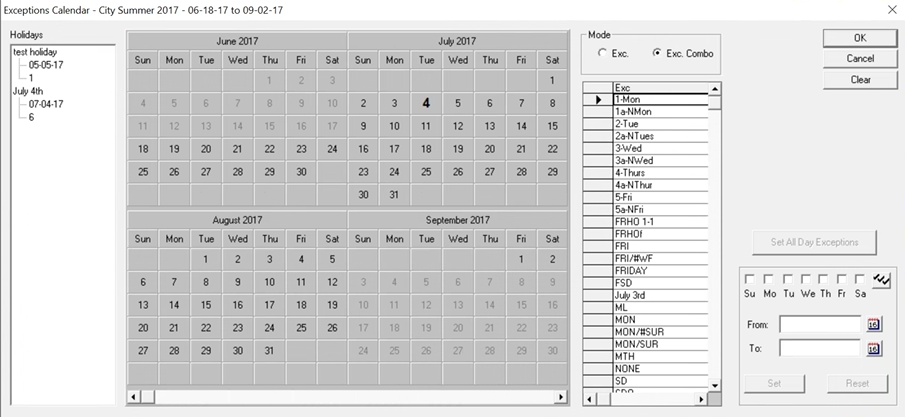
- Changes have been made in the Exceptions Calendar dialog:
- Removed the Update Service Group Combos check box - The system now automatically updates the exception combos when users make changes to the exception calendar. If some exception combos are to be deleted during the update, a message now appears that asks if the user wants to proceed.
- Added a pane on the left of the calendar listing the Holidays of the selected sign-up period. It shows the Holiday name, date, and the service group running on the holiday.
- Days that are set
as holidays are now shown in bold text in the calendar.*
FX Tools
- The following options
have been added to the FX Data Integrity Check tool:
- Duplicate Run Name
- Check Across Overlapping Signups in Other Agencies
These options were added under Runs to help check data integrity if the database contains data from more than one agency.*
- Trip End Time After Pull-in Time - This option was added under Blocks. If selected, FX checks for trips that end after the pull-out time. When users click the ITS button, this option together with the Pull-in/Pull-out Mismatch and Trip Start Time Before Pull-out Time options are automatically selected.*
- Number of Routes in Block - This option was added under Blocks. If selected, FX checks the number of routes in a block. *
- Missing Holidays in SignUp - This option was added under Miscellaneous. If selected, FX checks for holidays that occur within the date range of the selected sign-up period but are not associated with the sign-up period. This check only applies when run for one agency.*