Place text in quotation marks for exact match search results.
Node to Node Run Time Report
The Node to Node Run Time report provides a summary of the run times between node to
node pairs on patterns of lines of the selected sign-up period.
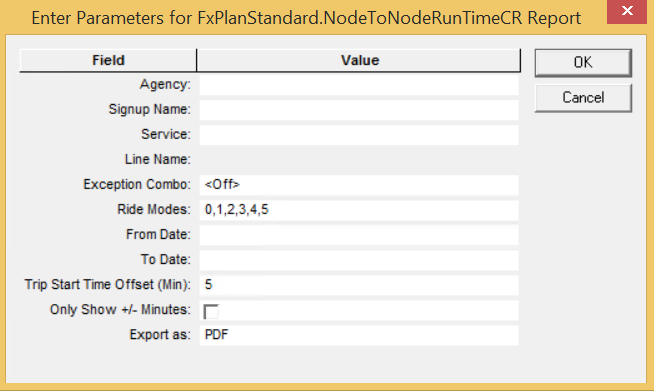
The following graphic shows the parameters of the report:
Table 1. Node to Node Run Time Parameters
Parameter
Description
Agency
(If applicable) Some transit organizations that offer continuous transit
service across several geographical areas consist of several units identified as
agencies.
Signup Name
Sign-up period
Service
Only the Service abbreviations and Service names of the selected sign-up
period are shown in the list.
Line Name
Only the Line IDs and Line names of the selected sign-up period are shown in
the list.
Exception Combo
Set of exceptions that operate together on specific days within the selected
sign-up period.
Ride Modes
Sample options on methods used to perform checks: Riding Survey Sheet, Riding
Handheld, Automated, Random, Point Survey Sheet, and Point Handheld. The result of
your selections are shown as numbers in the field.
From Date
Start date of the date range covered in the report.
To Date
End date of the date range covered in the report.
Trip Start Time Offset (Min)
If an offset (in minutes) is set, trips with the offset value plus or minus
the Start Time are considered.
Only Show +/- Minutes
If selected, the run time of node to node pairs is only shown once if it is
the same throughout the day. Also, run times that are different are shown.
Export as
Report format options are: PDF, CSV, Excel (spreadsheet), RTF, and Word (word
processor). Set to PDF by default.
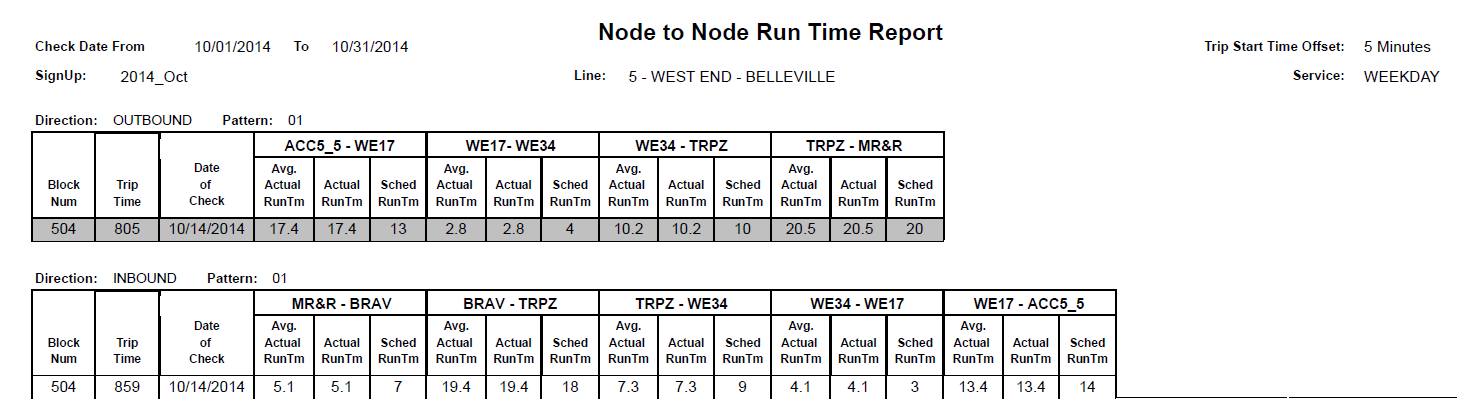
The following graphic is an example of the Node to Node Run Time report for one
line: