
About Transfer Identities to LDAP
You can map existing users to their LDAP log in identities.
Trapeze provides a tool to simplify converting your users to LDAP. If you have already created users in Trapeze with the same user names as on LDAP, the tool will automatically map them and the LDAP log in will be used. If the user names differ, the tool provides an easy interface for mapping Trapeze users to their LDAP identities.
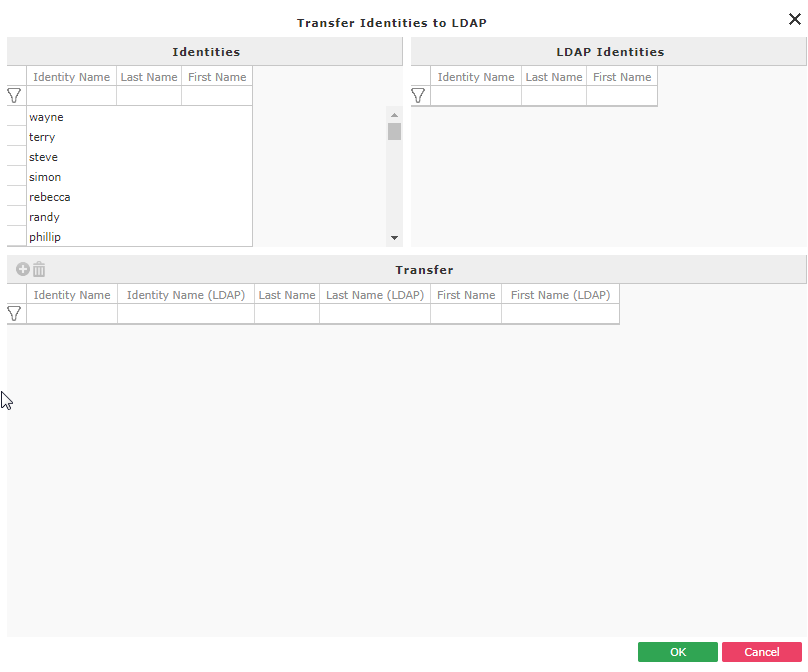
The Transfer Identities to LDAP screen has three panes.
| Pane | Description |
|---|---|
| Identities | The list of built-in accounts (Trapeze created users) not automatically mapped to an LDAP user. Automatic mapping happens when the built-in user name is identical to the LDAP user name. |
| LDAP identities | The list of LDAP user accounts not automatically mapped to a Trapeze created user (built-in). Automatic mapping happens when the built-in user name is identical to the LDAP user name. |
| Transfer | If you have built-in users (Trapeze created users) that have the same user name as their LDAP account, the Transfer pane is automatically filled with those users. As you manually link built-in accounts with LDAP accounts, they will appear in this pane. |