
Troubleshooting
Some common issues and suggested steps to resolve them:
General Tip
To help identify LDAP issues more quickly, make sure to set the Trace switch to Verbose. To set the switch:
- In the Service Shell, click .
- In the Trace Options dialog box, click .
-
In the Trace Level pane, select
Verbose.
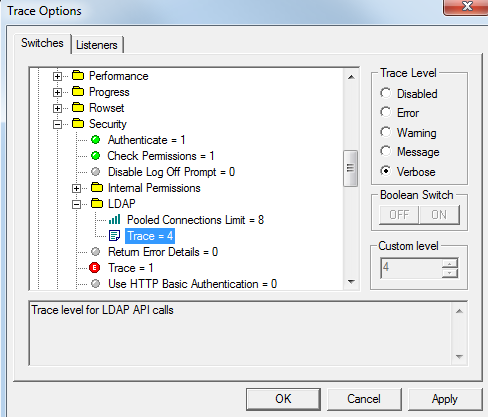
- Click Apply.
- Click OK.
Only Built-in users on list, LDAP users not shown
If you do not see any LDAP users (users added when in the LDAP mode), then there was an error returning the users from the directory.
Check the CDBLog of the TP6 service shell.
| Error | Solution |
|---|---|
|
Size Limit Exceeded The exact cause of this issue is unknown. It appears that the size of the list of users returned is too large. |
|
|
Invalid Credentials Your password or login did not work. |
Double-check the login and password that was set in Server Connection. |
| LDAP users are on the list, but a specific user is not. | Apply the solutions suggested for Size Limit Exceeded. |