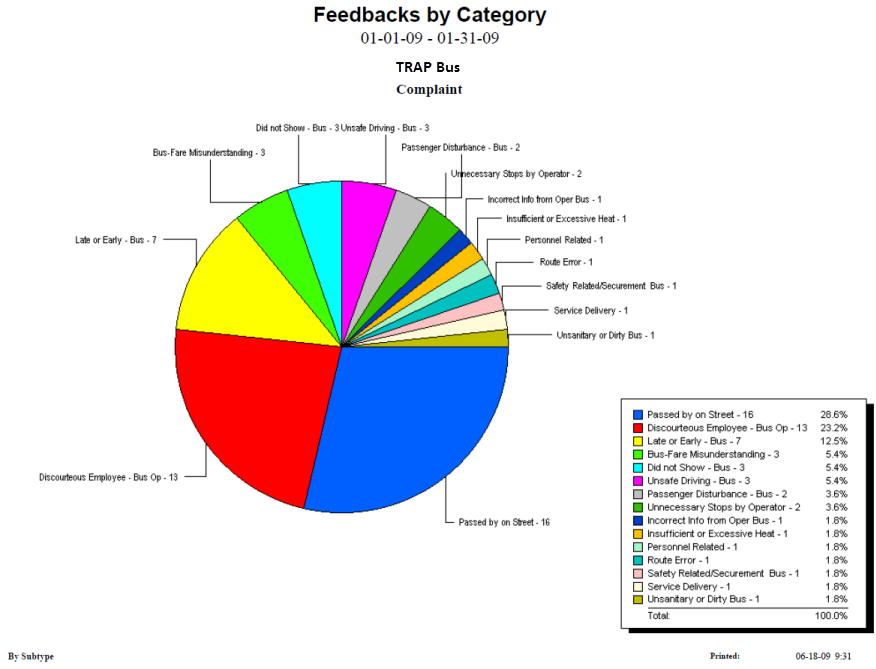
The Feedback by Category report provides feedback statistics by division (category)
within the selected date range, displaying a pie chart with each of the feedback subtype
represented by a color.
Parameters
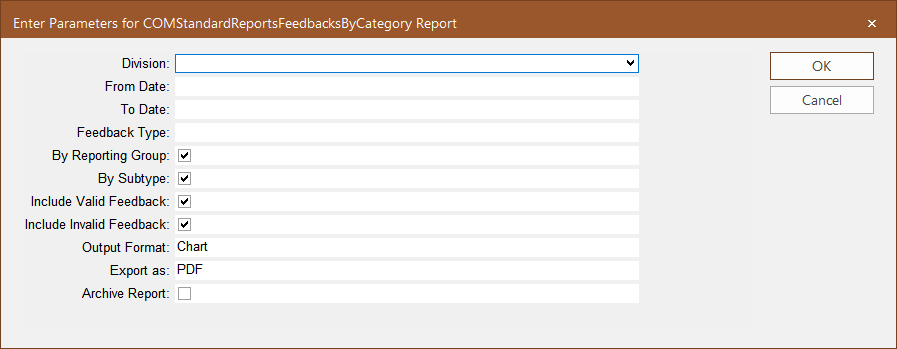
The following graphic shows the parameters that you can set to generate the report.
Table 1. Feedback by Priority Parameter
Parameter
Description
Division
Divisions involved in resolving issues raised in customer feedback.
From Date
Start date of the date range covered in the report.
To Date
End date of the date range covered in the report.
Feedback Type
Feedback type included in the report.
By Reporting Group
Report Group by which the feedback is sorted in the report.
By Subtype
Feedback subtype by which the feedback is sorted in the report.
Include Valid Feedback
If selected, only feedback with the selected Feedback subtype that is marked
valid in the COM Investigator or COM Representative screen is included in the
report.
Include Invalid Feedback
If selected, only feedback with the selected Feedback subtype that is not marked
valid in the COM Investigator or COM Representative screen is included in the
report.
Checking both Include Valid Feedback and Include Invalid Feedback options means
that all feedback with the selected feedback subtype will be included in the
report.
Export as
Format type of the report when exported – The options are:
csv - (comma or character-separated values) Comma delimited file
Excel - (Microsoft® Excel) Spreadsheet
PDF - (Portable Document Format) Viewed using Adobe
Reader®
RTF - (Rich Text Format) Formatted text
Word - (Microsoft Word) Formatted text
This is set to PDF by default.
Archive Report
If selected, a copy of the report is saved so it can be later viewed in the
Report Archive module.
Sample Report
The following example shows the distribution of the Complaint feedback subtypes for the
specified date range in a pie chart.