
Spooling Feedback Data
If your printer is busy or not available to print the feedback data immediately, you may choose to print the records at a later date and time.
- In the Feedback pane, select the feedback records that you want to print.
-
On the screen toolbar, click the Form Letter Spooling button:
 .
A message appears confirming the number of feedback records selected.
.
A message appears confirming the number of feedback records selected.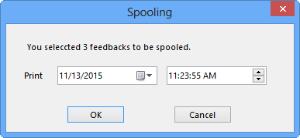
- Optional:
On the Print fields, change the date and time indicated if you
want to have the data printed at a later date and/or time.
The data is sent to Notification Service and printed on or sometime after the selected date and/or time depending on the availability of the printer.
-
Click OK.
The check boxes of the selected feedback records in the Spooling column are selected.