
General New Features
This document highlights the new features and changes that apply to most Traveler Information version 19 products. Items with a * were introduced (partly or in whole) in a maintenance release build of v18.
Address Matching
- The following context properties have been added to control the "Free-form Address"
feature in the Address fields when geocoding:
- MAP/AddrMatch/AddressManager/FreeFormMatch/Enable
- MAP/AddrMatch/AddressManager/FreeFormMatch/IgnoreOtherAddressElements
- The following
Map/MapAddress/Trapeze4/Config context properties have been
updated to be dependent on the profile name:
- MAP/MapAddress/Trapeze4/Config/Host
- MAP/MapAddress/Trapeze4/Config/Port
- MAP/MapAddress/Trapeze4/Config/Username
- MAP/MapAddress/Trapeze4/Config/Password
CTM Server
- A new option, Weighted has been added for sorting itinerary
solutions in the Parameters tab. It combines travel time and
walking distance. Click the Value field of the Default
Itinerary Sort parameter to view the option.

- The following switches have been added to control how transfer distances are treated
during itinerary searches:
- CTMSrv/Exp/Calculate Transfers Walkout Distance - If selected, the walking distance on transfers are recalculated. If not selected, the distances are not recalculated; the system uses the values returned from the search algorithm.
- CTMSrv/Exp/CalculateWalkingDistanceBeforeFilteringItineraries - If selected, the walking distances are calculated first then the itinerary results are sorted and filtered. If not selected, the itinerary results are sorted and filtered before the walking distances are calculated.
- The Core Performance Monitor can now be activated for the CTM
Server. The switches to configure it are under
Core/Performance/Monitors/Default:
- Enable
- Enable Log
- Trace
To view these new switches in the Trace Options dialog box, click in the CTMSrv dialog box.
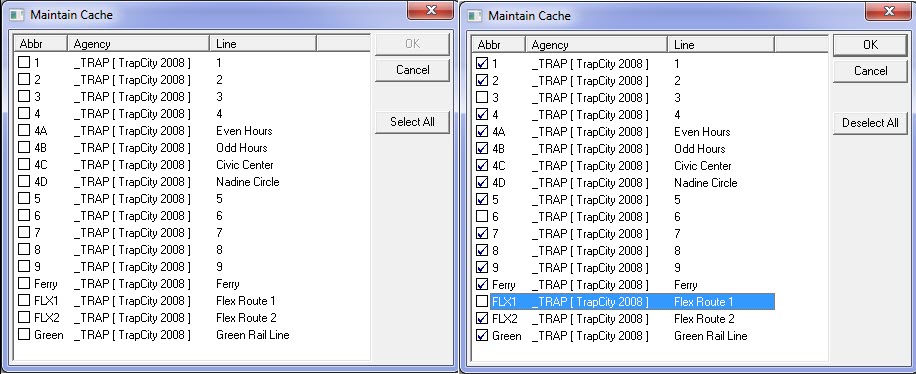
- In the Maintain Cache dialog box, users can now toggle between
selecting all routes or clearing their selection with the new Select
All/Deselect All button.
- An auditing feature has been added to the Parameters tab to track the changes that have been saved including who made them.