
IVR Activity Report
The IVR Activity report is designed to be run with previously created Report Group activities. It must be run individually on a group by group basis.
Before Running the Report
At least one Report Group must be defined. A Report Group is a collection of Device Activities that are to be displayed on one report. As an example, you might include all of the Main Menu options in a single report group in order to determine the number of callers using each menu option.
The Client Shell and the Reports context properties must be configured appropriately.
Parameters
The report displays a bar graph displaying log counts for each activity within the log period requested. This Report looks solely at the device summary information.
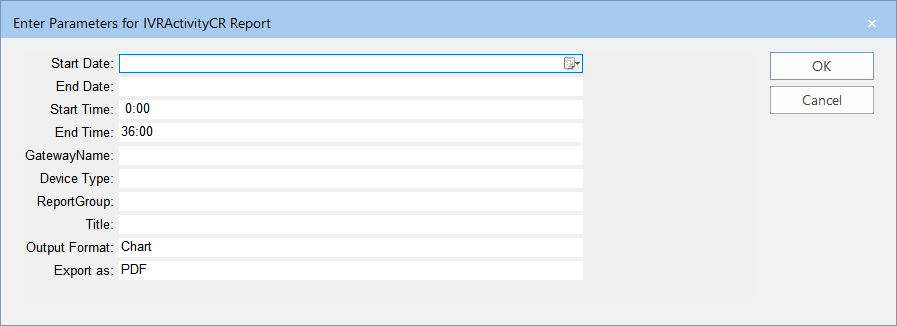
| Parameters | Description |
|---|---|
| Start Date | Start date of the date range covered in the report. |
| End Date | End date of the date range covered in the report. |
| Start Time | Start time of the time period covered in the report. |
| End Time | End time of the time period covered in the report. |
| Gateway Name | Name of the gateway device. |
| Device Type | Device through which communications are sent. The options shown in the list box depend on the Device Types ancillary data created, for example: Email, SMS and Voice. |
| Report Group | Report Group created for a specific purpose, for example, to track successful and failed login attempts. The options shown in the list box depend on the Report Groups created in the Report Groups Manager in the INFO web portal. |
| Title | Report Title or Custom title that you want to apply to the report. |
| Increment | Amount by which the data is added. The options are:
|
| Output Format | Representation of the data. The options are:
|
| Export as | Format type of the report when exported – The options are:
|
Sample Report
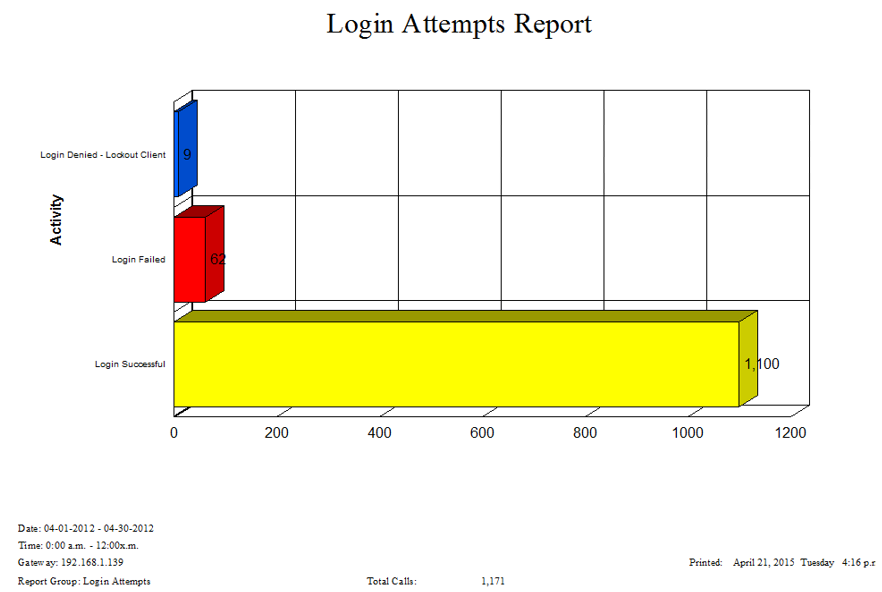
The bars show the successful, failed, and denied login attempts tracked over a defined time period and date range.