
Setting Archive Assistant Properties
System administrators can set up the Archive Assistant using system properties in the Trapeze4 Workstation.
Procedure
-
In the Trapeze4 workstation, click .
The Properties dialog box appears.
-
On the Profile tab, click the plus (+) sign to the left of the
Archiving folder.
Archiving properties appear.
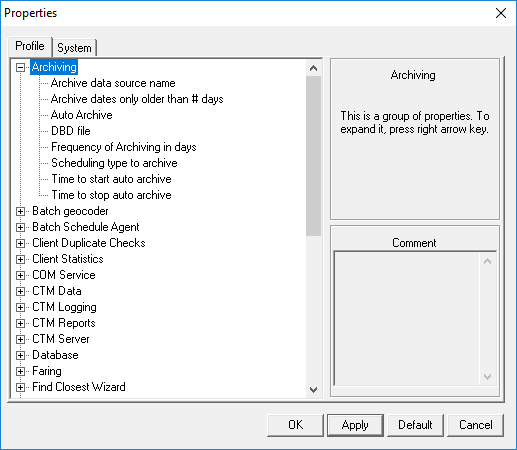
-
Specify values for the following properties:
- Archive data source name
- In the list, click the source database from which you want to archive data.
- Archive dates older than # days
- Type the number of days that must have elapsed before you can archive data for a date.
- Auto Archive
- Select Yes to automatically archive or
No to manually archive.
Trapeze recommends setting the Auto Archive property to No. Otherwise, archiving begins automatically when you launch the Archive Assistant and you are unable to select custom options first.
- DBD file
- In the DBD file field, specify the name of the database description (.dbd) file for the archive database.
- Scheduling type to archive
- Used with the Auto Archive property.
- Time to start auto archive
- Used with the Auto Archive property. Select or type the time to begin the auto-archive process.
- Time to stop auto archive
- Used with the Auto Archive property. Select or type the time to end the auto-archive process.
- Click OK.