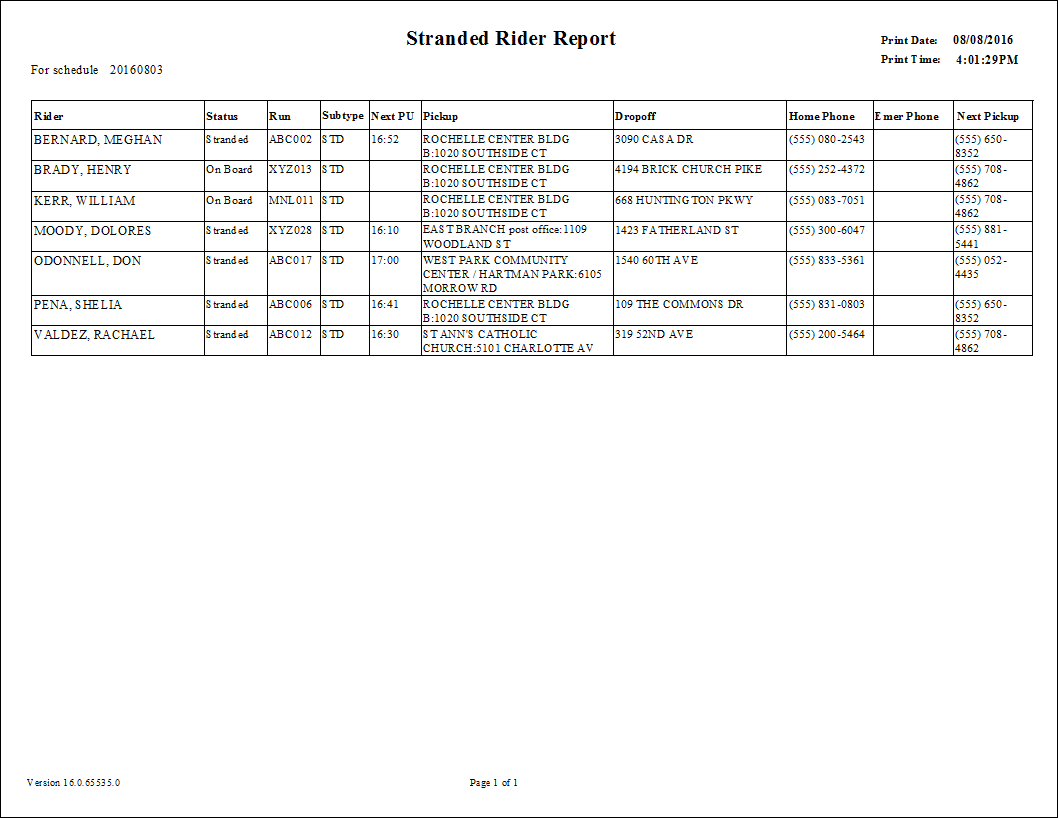
Stranded Rider Report
Should an accident occur, a paratransit operator may need to provide information about paratransit clients to police or emergency response personnel. In some cases such as a natural or man-made disaster, you must be able to identify all clients for whom you are responsible.
The Stranded Rider Report is designed to identify these clients. These clients might have been on board the vehicle, or they might have been dropped off yet still require a return trip, or they might have additional essential trips scheduled later in the day.
| Parameter | Description |
|---|---|
| Date | Date for the report. The default is the current date. |
| From Route | Start of range of runs to include in the report. Default is the first run in the pull-down list (sorted alphabetically). |
| To Route | End of range of runs to include in the report. Default is the last run in the pull-down list (sorted alphabetically). |
| Subtype |
(Applicable only if Future by Subtype is checked for Essential Trips) Subtypes to be included. “All” is marked by default; clear the check box to choose individual subtypes. |
| Providers | If All is selected, records for all providers appear in the report. If All is cleared, select individual providers from the list. The options available to you depend on provider security. |
| Essential Trips |
Select essential trips to include in the report:
|
| Order by | Choose a sort order criterion: Client, Run, or Time. |
| Include Trip Type | Schedule statuses to be included:
|