
Defining Segment Costs
Segments are an optional part of provider costing used for guaranteed earnings.
Before you begin
About this task
Typically, a segment is defined by a From activity and a To activity, but these activities do not have to be contiguous (that is, other activities may occur after the From activity but before the To activity). For provider costing purposes, segments are usually defined by activities that are geocoded at a garage. For example, a segment may be defined as from Pull-out to Pull-in. Other examples might be Pull-out to DriverRelief, DriverRelief to DriverRelief, DriverRelief to Pull-in, and so on.
Procedure
- In the Contract frame, click the contract for which to define segment costs.
- In the Validity pane, select a validity in the grid.
-
Click Edit.
The buttons in the Validity frame become available.
-
Click the Segment cost button.
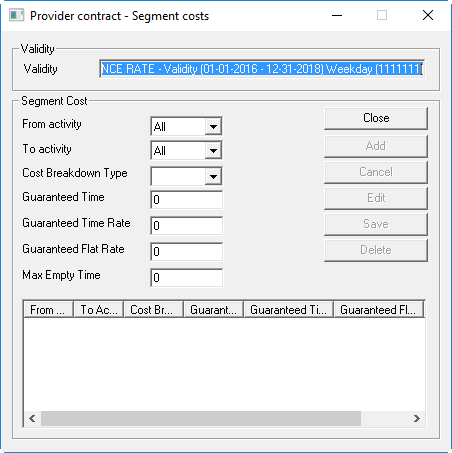
The Provider contract - Segment costs dialog box appears.
-
Provide the following information:
- From activity
- Click the activity from which you want to assign the segment cost.
- To activity
- Click the activity to which you want to assign segment cost.
- Cost Breakdown Type
- Click the appropriate cost breakdown type.
- Guaranteed Time
- Type the minimum amount of time guaranteed to be paid for this segment.
- Guaranteed Time Rate
- Type the hourly charge to be applied to the guaranteed time.
- Guaranteed Flat Rate
- Type the flat rate that should be added to the guaranteed payment of the segment.
-
Click Add.
The segment cost rule is added to the grid.
-
Restart the Schedule Server application.
If you change the rate profiles retroactively, Schedule Server recalculates them when you load the schedule.