Jump to main content
Place text in quotation marks for exact match search results.
Verifying the MDT Server Configuration
Procedure
-
Click .
The
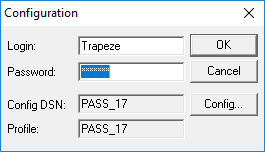
Configuration dialog box appears.
-
Verify your Login name, Password, and the
Configuration Data Source Name (ConfigDSN).
- Optional:
To enter a different data source, click Config.
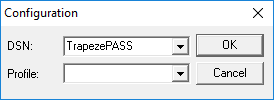
Another
Configuration dialog box appears.
-
From the Profile list, select the appropriate data source.
Your profile appears if the correct Config DSN is chosen.
-
Click OK.
-
Restart the MDT Server application.
![]()
TRADE SECRET. Trapeze Proprietary and Confidential. © Trapeze Software ULC, its subsidiaries and affiliates. All rights reserved.