
Viewing MDT Information
Details about MDT vehicles can be gather directly from MDT Center.
Before you begin
About this task
- Message Log
- Provides an overview of all incoming and outgoing messages, with times. It is the only place where the dispatcher can see what text messages have been sent.
- Manifest
- Displays the client events for the selected vehicle and is used primarily for troubleshooting activities. For example, if a driver is missing a trip on the mobile computer, check the manifest. If the trip is there, the problem may reside with the communication between dispatch and the mobile computer.
- Vehicle Info
- Shows information about the vehicle such as capacity type, last service date, and year.
Procedure
-
In the MDT Center screen, click MDT
Info:

The MDT Information dialog box opens.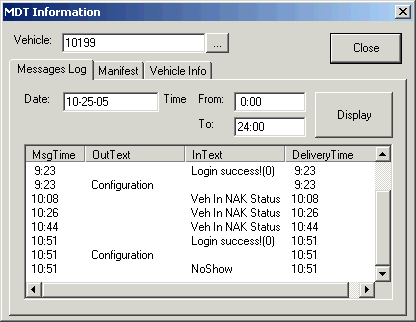
- In the Vehicle field, type the number of the vehicle you want to inquire about.
- Click Display.
-
On the Messages Log tab, do the following:
- Type the date and a time range for which you want to see records.
- Click Display.
- Optional:
On the Manifest tab, review the information.
The Manifest tab does not show non-trip events such as pull-outs and breaks.
- Optional: Review the information on the Vehicle Info tab.
- Click Close.