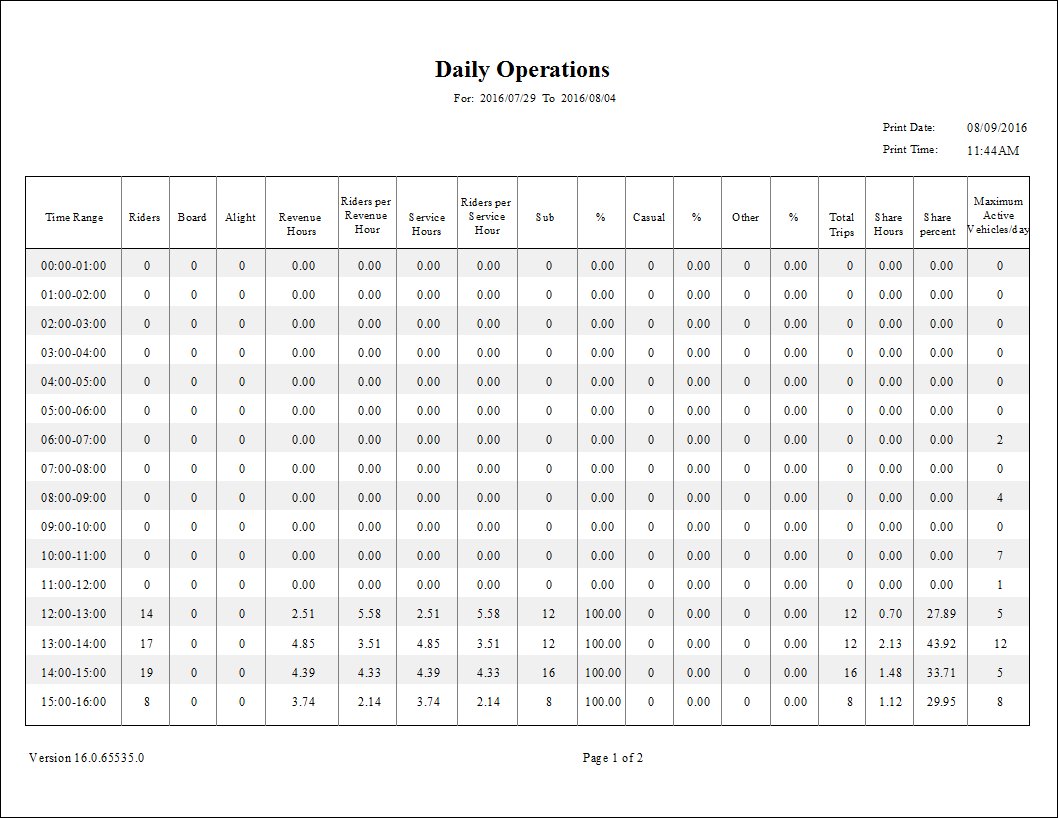
Daily Operations Report
The Daily Operations report shows operational statistics for a site, including ridership, service hour, and revenue hour information, by hour of the day. The report shows total subscription, casual and other trips and the total percentage of rides on each route.
| Parameter | Description |
|---|---|
| Type | Schedule type. |
| Date/Weekday | Specifies whether the report is for specific dates or days of the week. Choose
the option appropriate for the schedule type:
If Weekday is selected in the Date/Weekday field, the From Date and To Date fields are disabled. |
| Weekday | Select one or more week days for which to run the report.
If Date is selected in the Date/Weekday field, weekdays can be selected to show only results for those days between the From Date and To Date. For example, choosing M (Monday) between 05/01/2018 and 05/30/2018 includes results for June 4, 11, 18, and 25. |
| Time Interval | Time groupings to appear on the report. Options include the following: 15 minutes, 30 minutes, 45 minutes, and 60 minutes. |
| From Route | First route in the report. |
| To Route | Last route in the report. |
| Sort Time | Sort order used in the report:
Note: The Sort Time should be set to the Est Time or the time that is entered in
the Schedule Editor. For example, do not sort on actual arrive time if you have not
entered these times. |
| Providers | If All is selected, records for all providers appear in the report. If All is cleared, select individual providers from the list. The options available to you depend on provider security. |