
Viewing Reliefs and Relinking Points
View the relief points assigned to a block at any time during the runcutting process.
- Select a block in either the Cut Pieces or Uncut Pieces grid.
-
Perform one of the following steps:
- Click .
- Click View Reliefs:

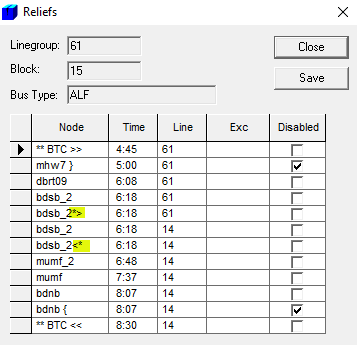
The Reliefs dialog displays the line group, block, bus type and all reliefs including deadheads for the selected piece of work in time order. It helps you understand the frequency of reliefs on runs. It shows you the relief points associated with a particular block.The following graphic shows two node/stops that serve as Created pull-out and pull-in reliefs and are used for relinking.
- Click Close.
The following table lists the operational signs representing the different types of reliefs including deadheads that you may see on the Reliefs grid.
| Operational Sign | Relief Type |
|---|---|
| ** (Double asterisk) |
Relief before the start of a run |
| >> | Pull-out garage |
| << | Pull-in garage |
| > | Created Pull-out garage |
| < | Created Pull-in garage |
| - | Break |
| + | Break relief |
| { | Pull-in or interline deadhead |
| } | Pull-out or interline deadhead |
| @ | Floating or Moving relief |
| * (Single asterisk) |
Used for Block relinking |