
Automatic Improve - One Theory
Improving your runs is key to saving you money. The theory states that improving your runs reduces total pay, reduces illegal runs, and achieves your desired run composition.
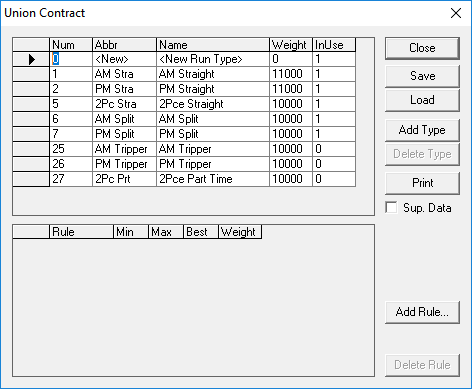
These rules are applied in different scenarios according to the distribution of runs you require. There is no generic approach as each transit site has its own particular requirements.
The following table describes the new set of rules:
| Rule | Description |
|---|---|
| Enable all the run types by typing 1 in the In Use column of the Run type frame | This allows the system to look for all kinds of run types. |
| The weights of all run types should be identical. | Type the same value for all run types in the Weight column, for example, 10,000. Increase the weight of a run type only if you want to have more runs of that specific run type. However, change this weight to the original value after you have achieved the run distribution you want. |
| The weights of all contract rules in the Contract Rules frame should be 0. | The only time you type 1 in the Weight column for a contract rule is when you want to increase, for example, the work time. If you do this, make sure to change the weight back to 0 after you have achieved the run distribution you want. |
| The weights of all contract rules in the Contract Rules frame should be 0. | The only time you type 1 in the Weight column for a contract rule is when you want to increase, for example, the work time. If you do this, make sure to change the weight back to 0 after you have achieved the run distribution you want. |
| Remove all NumRun contract rules from your Contract Rules frame. | Use this contract rule as infrequently as possible because it hinders the system
from looking for the lowest cost solution. Use the NumRun contract rule only to control the number of runs of a specific run type. In all cases, when adding values for the NumRun contract rule, the Min value must be equal to or less than the number of runs of the run type that you currently have and the Max value must be equal to or greater than that number.To maintain a certain number of runs, type the number in the Max field of the run type and type 0 in the Min field. To increase the number of runs, type the desired number in the Min field and type a larger number in the Max field. |