
Improving Your Runs
You can use automatic runcutting to improve your runs.
-
Click Runcutting > Automatic Runcutting.
The Automatic Runcutting dialog box appears.
-
Click Union Contract.
The Union Contract dialog box appears.
- In the In Use column of the top frame in the Union Contract dialog box, make sure that all run types have a value of 1.
- Review the contract rules of each run type. Make sure that all contract rules have a weight of 0.
- To control the number of runs of a certain run type, remove any NumRun contract rule or retain it.
- Optional:
To save the values you changed or entered, click
Save. The Save Union Contract File dialog
box appears.
- In the File name field, type the name of the file.
- Click Save. The file is saved with a *.uc file extension.
- Click Close.
-
In the Automatic Runcutting dialog box, click
Parameters.
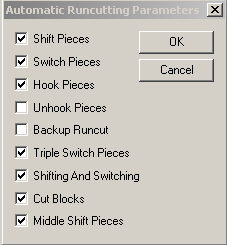
The Automatic Parameters dialog box appears.
-
Select all the check boxes except the Unhook Pieces and
Backup Runcut check boxes.
- Click OK.
-
In the Automatic Runcutting dialog box, click
Improve.
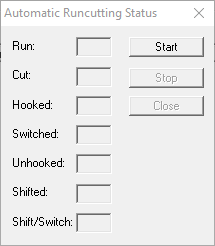
The Automatic Runcutting Status dialog box appears.
-
Click Start.
The values in the Automatic Runcutting Status dialog box change dynamically as the system cycles through the runs. It stops when it finds the lowest cost solution. The final values reflect the options that you selected in the Automatic Parameters dialog box.
- Optional: Click Stop to interrupt the process.
-
Click Close.
The runs appear in the Automatic Runcutting dialog box.
- Click Costing to view the Costing Summary dialog box.
- Optional:
Click Print to view the results of the
Improve process in a text file.
- Take the printout of your previous Costing Summary or maximize the previous text file and compare the two sets of statistics.
- Click Close in the Costing Summary dialog box.
-
If the Improve results are satisfactory, click Apply.
The improved runs in the Automatic Runcutting dialog box replace the runs in the Cut Pieces grid.
- Optional: If you still do not have the numbers you are looking for, try another combination of values in the Union Contract dialog box and repeat the Improve process.
- Click Runcutting > Update Costingafter you have achieved the runs you want.
- Save your runs to complete the runcutting process.
After you have reached the desired results, apply the Update Costing feature again on the improved runcuts.