
Adding Holidays
Holidays is a General type of ancillary data shared by FX with other Trapeze applications. The Holidays ancillary data is used to identify days when the standard service is not operating due to a holiday.
-
To open the Holidays ancillary data, click .
The Holidays dialog appears.
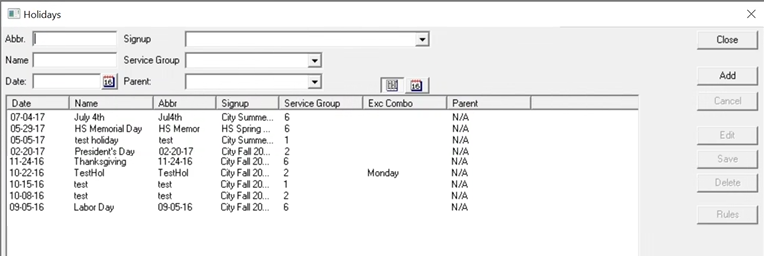
- In the Abbr field, type an abbreviation for the holiday.
- In the Name field, type the name of the holiday.
- In the Date field, type the date of the holiday. To view the calendar, click the calendar icon:
- (Used in PASS and OPS) In the Parent field, identify a new holiday with an existing holiday. For example, for holiday Christmas 2022 - December 25, 2022, the parent holiday is Christmas 2021. If a date interval rule references a holiday, it will also apply to another holiday which has that holiday as a parent. This allows you to add holidays each year without having to revise all of the date interval rules.
- From the Signup list, choose a sign-up period.
-
From the Service Group list, choose a service group.
Important: You must create Service Groups ancillary data for the menu to be populated.
-
Click Add.
Note: To view the calendar of existing holidays, click the calendar icon beside Add:
 Click the list icon to return to the list of holidays:
The Exc column shows if there is an exception applied to the holiday.
- Click Save.
- Click Close.