
Creating New Tables
A new table may be required when a new feature is introduced to store the additional data. In some instances, a new table may be used for temporary data storage
- In the left pane, click Tables.
-
Right-click and click New Table.
A new table is added to the list of tables.
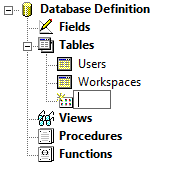
- In the blank field, type the name of the new table.
- Press ENTER.