
Reviewing a Sample Scenario
The procedure of using the Improve function is illustrated with this example: removing the trippers that were created in the initial runcut.
There are several ways you can get rid of the trippers; a common approach is to make a contract rule of the run type “illegal.”
- Follow the procedure in Improving Rosters. In step 2, while in the Run Type frame of the Union Contract dialog box, select the AM Trp run type.
- In the Contract Rule frame for this run type, choose a contract rule and make it illegal, for example, choose Platform time and change the value in the Min or Max field.
- Make similar changes to the PM Trp and 2 Pc Prt run types.
- After making the changes, in the Union Contract dialog box, click Improve.
-
After the Improve process, open the Costing Summary dialog box.
Click Print.
The data appears in text editor format. Review the data.
-
Compare the statistics of the runcut and the Improve process.
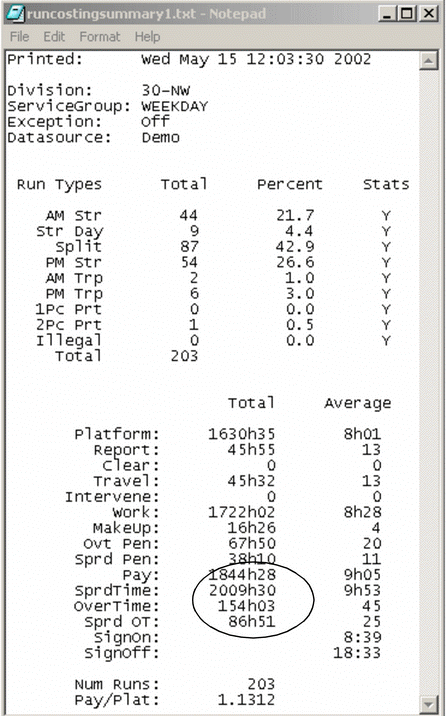
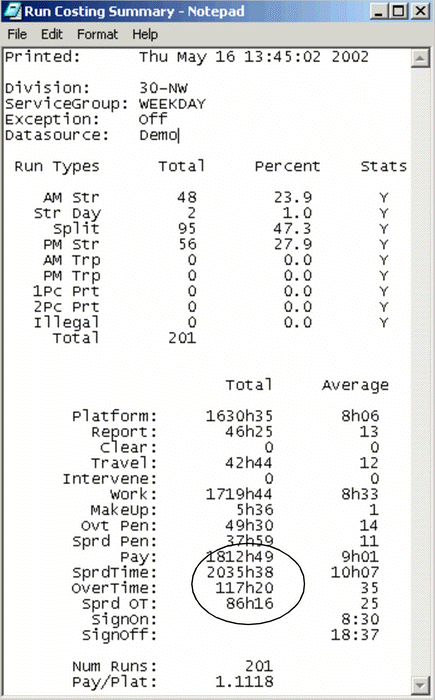
In the example shown in the following graphic, note that of the total 203 runs, there are two (2) AM Trp (Trip), six (6) PM Trp and one (1) 2 PC (Piece) Prt (Part-time) runs. There are no longer any Tripper or Part-time run types and the Pay total has been reduced by as much as 32 hours.
- If the distribution of runs meets your requirements, complete the Improve process.