Defining a route may be necessary if you have a new driver who requires detailed
directions or when a vehicle has broken down somewhere in the service area and you have to send
a maintenance crew to it.
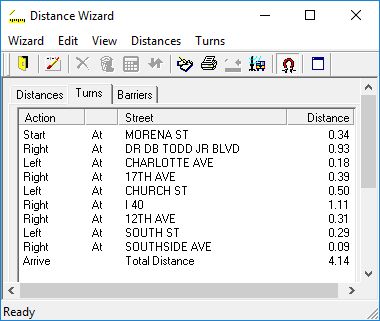
The Turns tab gives you a detailed list of instructions to
travel from the origin to the destination you plotted earlier on the
Distance tab.
-
Click .
-
Click the Distance tab.
-
In the Method frame, click Routing.
Clicking any other method will prompt a message when accessing the
Turns tab that states The Turns tab is available only when
the Routing method is chosen on the Distance tab.
-
Click the Retrieve Address button:

The Distance Wizard lists the streets or intersections in the bookings, and shows the
distance between the points.
-
Click the Turns tab.
Directions, turn by turn, from the Origin to the Destination and the distances between
each turns are shown. The starting point, distance between each turn, and the total distance
are shown.