
Increasing Identification Numbers
Unique numeric identifiers in MapEdit are assigned automatically by increasing the highest existing Id by one.
In some cases, it may be advantageous to shift these Ids to a higher value, for example, so that they can be easily differentiated from the previously existing ones. In this case, use the Next Id's option.
-
Click .
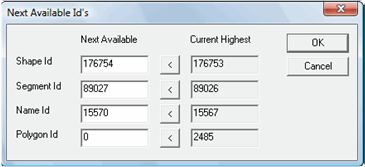
The Next Available Id's dialog box appears and shows the next available and current highest numbers for each ID type: Shape Id, Segment Id, Name Id, and Polygon Id.
-
Do one of the following steps:
- To set a next ID number to one more than the Current
Highest number, click the button for the ID type:

- To specify another next ID number, type the value in the Next Available field.
- The next ID number must exceed the Current Highest value for the ID type.
- To set a next ID number to one more than the Current
Highest number, click the button for the ID type: