Buffer Properties
The following table describes the fields in the Buffer Properties dialog box.
| Fields | Description |
|---|---|
|
Name |
Displays the name of the buffer that you selected. You can change the name to something different. |
| Type | Displays the type of buffer selected. |
| Buffer Radius |
Shows the current radius. You can change it here and view the corresponding area size in the Buffer Area field. |
| Buffer Area | Displays the calculated area of the buffer. |
|
Appearance/Display Buffer |
If selected, the buffer around a geographic attribute is displayed on the
map. Note: This option is not available for all geographic attributes. |
|
Appearance/Frame |
Allows you to select the color of the buffer and width of the line around the
buffer:
|
| Appearance/Fill |
Allows you to select the color of the area representing the buffer:
|
|
Appearance/Line Trace |
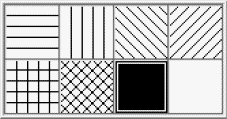
Allows you to select the appearance of the line trace. (Shown if Pattern trace type is selected.) |
| Appearance/Polygon | Allows you to select the appearance of the line trace. (Shown if Polygon trace type is selected.) |
| Appearance/Point | Allows you to select the appearance of the line trace. (Shown is Location point type is selected.) |
| Street Name/Show Label |
If selected, the name of the geographic attribute is displayed on the map using the text in the Name field. |
|
Text |
Opens the Label Appearance dialog box, which allows you to
change the appearance of the buffer label:
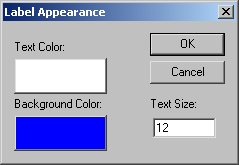
Note: Depending on the selected geographic attribute, you may or may not have the
option to change the background color of the label.
|