
Performing (General) Analyses

You can perform a general analysis of locations using the Locations tab in the PLAN Options dialog box.

  1. In the Spatial Analysis screen, do one of the following: steps
    • Click Analysis > Setup.
    • Click the Setup button: Setup button
    The PLAN Options dialog box appears.
  2. Open the Location tab.
    The data source appears in the Datasource frame.
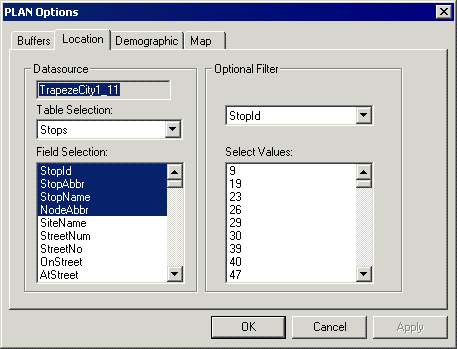
    PLAN Options dialog box with the Location tab open
  3. In the Table Selection drop-down list, select a table.
    The fields that are available in the selected table automatically appear in the Field Selection list.
  4. To select the fields to include in your analysis, do one of the following steps:
    • To select one field only, click the field name.
    • To select several adjacent fields, do one of the following steps:
      • Press SHIFT and then click the first and last field names.

        All of the field names in between are selected.

      • Click the first field and drag the pointer down to the last field.
    • To select several separate fields, press CTRL and then click each field name that you require.
  5. Click OK.