Place text in quotation marks for exact match search results.
Getting More Information from Queries
You can retrieve more details about unsuccessful trips such as the origin and destination of the trips and the reasons why they were unsuccessful.
In the Spatial Analysis screen, do one of the following
steps:
Click Analysis > Point Location Query.
Click the Point Location Query button:
The Point Location Query dialog box appears.
Add more fields to your SQL query.
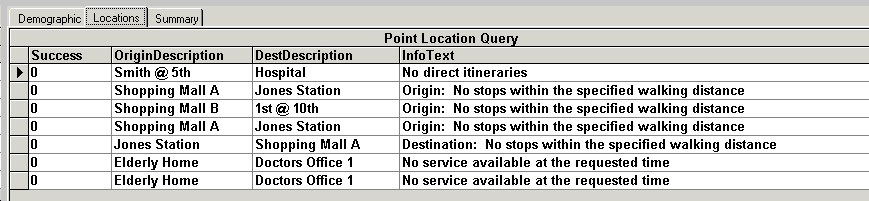
In the following example, the origin and destination descriptions fields and the
InfoText field, which stores the reasons the trip was unsuccessful, have been
added.
SELECT "CtmRequests"."Success","CtmRequests"."OriginDescription",
"CtmRequests"."DestDescription","CtmRequest"."InfoText"
FROM "CtmRequests"
WHERE "CtmRequests"."Success"=0
Click the Process button: .
The results appear on the Locations tab.
The new fields that you added now appear in the query results. The results that are
displayed on the Locations tab indicate that more stops need to be
added at both Shopping Mall A and B.


 .
.