Mapping Groups
You can map LDAP groups to Trapeze security groups. This automatically assigns group members the permissions they require.
-
In the LDAP Settings screen, click the LDAP group you want
to map in Search Results and the Security Group you want to map it to in
Security Group Mapping.

-
Click New
 The Security Group Mapping table is updated.
- Optional:
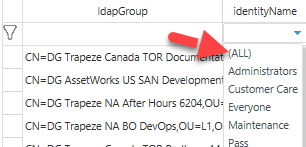
If you have a lengthy list of mappings, you can click in the filter row to list
only the mappings you want.
In this example, we've clicked the identityName field to display the security groups that are mapped. Clicking one security group would show only the LDAP groups mapped to it.